


For developers searching for a WeChat Mini Program Cloud Development local emulator with Docker, the first thing to understand is that WeChat did not provide one universal Docker-based emulator that reproduces every part of cloud development on a developer’s computer.
In the 2024 development workflow, the important capability was local Docker debugging for WeChat Cloud Run (微信云托管). A backend service could run inside a Docker container on the developer’s machine, while WeChat Developer Tools’ Mini Program simulator could call that local container through wx.cloud.callContainer(). Tencent’s tooling also provided a separate Live Coding workflow for changing code without rebuilding the container after every edit.
That distinction matters because WeChat Mini Program Cloud Development, Cloud Functions, CloudBase, and Cloud Run are related technologies, but they are not interchangeable. Current CloudBase documentation explicitly distinguishes WeChat-native Cloud Development using wx.cloud from standalone CloudBase environments and their SDKs.
The practical result is a useful local-development architecture:
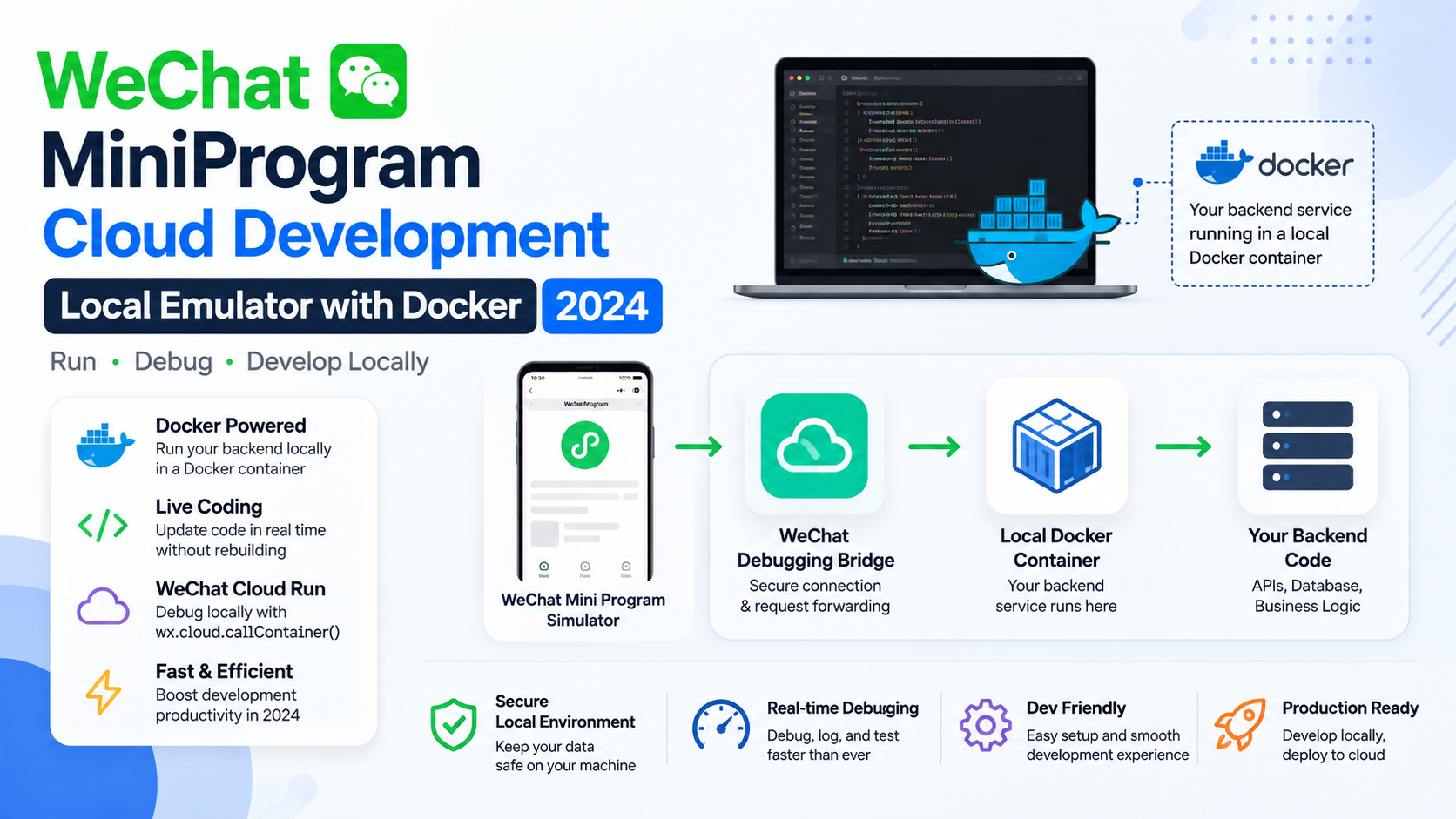
WeChat Mini Program simulator → WeChat debugging bridge → local Docker container → your backend code
This article explains what that setup actually was, how it worked, how to configure it, what Docker was doing, how the Mini Program connected to the container, what limitations existed, and which parts of the 2024 workflow should not be confused with a complete local cloud emulator.
What “local emulator” means in WeChat Mini Program Cloud Development
The word emulator can be misleading in this context.
WeChat Developer Tools already includes a Mini Program simulator. That simulator reproduces much of the client-side Mini Program runtime so developers can test pages, UI behavior, API calls and application logic without constantly deploying to a phone.
Docker addresses a different problem: running the backend locally in an environment that resembles the production container environment.
In the 2024 WeChat Cloud Run workflow, developers could:
- Put their backend application in a Docker project.
- Build and run the container locally.
- Use the Weixin Cloudbase VS Code extension to expose the container for WeChat debugging.
- Attach the local container to WeChat Developer Tools.
- Run the Mini Program in the simulator.
- Make
wx.cloud.callContainer()requests from the Mini Program to the local container instead of the deployed cloud service.
So the “emulator” was really a local integration-debugging environment, not a simulated copy of every Tencent cloud service.
This is an important distinction for developers because a Docker container can reproduce your application runtime very well, but it does not automatically reproduce CloudBase’s complete managed infrastructure.
WeChat Cloud Development vs. WeChat Cloud Run
The terminology around Tencent’s cloud products can be confusing.
Traditional WeChat Cloud Development
WeChat-native Cloud Development provides backend capabilities such as:
- Cloud Functions
- Cloud Database
- Cloud Storage
- built-in Mini Program integration
- WeChat identity information in supported server-side calls
For example, a Mini Program can call a Cloud Function directly with wx.cloud.callFunction(). Current CloudBase documentation continues to describe this as the native Mini Program path, with the caller’s identity automatically carried into the function context.
WeChat Cloud Run
Cloud Run, historically exposed to WeChat developers as 微信云托管, uses containers for backend services.
Instead of deploying a Node.js, Java, Go, Python or similar application as an individual serverless function, you package the service as a container and deploy that container to the managed runtime.
Tencent describes WeChat Cloud Run as a cloud-native, managed backend platform for Mini Programs and Official Accounts.
This difference explains why Docker is central to the local workflow.
A Cloud Function development workflow and a Cloud Run container development workflow are not the same thing.
Why Docker was used for local Cloud Run development
The strongest reason for using Docker is environment consistency.
Imagine a developer runs an application directly on Windows or macOS. It may work perfectly because their computer already has:
- a particular Node.js version,
- native libraries,
- system packages,
- environment variables,
- a locally installed database client,
- and other dependencies.
The same application may then fail when deployed to the managed cloud container because those dependencies were never declared in the image.
Tencent’s Cloud Run troubleshooting documentation specifically recommends local Docker-based development because applications that work on a developer’s machine can otherwise fail after deployment when dependencies, Dockerfile instructions or database addresses differ.
Docker changes that model.
The application is developed inside essentially the same kind of containerized unit that will eventually be deployed. That makes the local environment easier to reason about.
A simplified architecture looks like this:
┌───────────────────────────────┐
│ WeChat Developer Tools        │
│                               │
│  Mini Program Simulator       │
│        │                      │
│        │ wx.cloud.callContainer()
└────────┼──────────────────────┘
         │
         ▼
┌───────────────────────────────┐
│ WeChat local debugging bridge │
│                               │
│ simulates required WeChat     │
│ request context               │
└────────┼──────────────────────┘
         │
         ▼
┌───────────────────────────────┐
│ Local Docker Container        │
│                               │
│ Node / Java / Go / Python ... │
│ Your backend application      │
└───────────────────────────────┘
The important point is that the Mini Program does not simply call localhost in the normal way. The WeChat development tooling provides the bridge that lets a callContainer request reach the local container.
What you needed for the 2024 Docker workflow
The documented 2024-era workflow used several components together:
| Component | Purpose |
|---|---|
| WeChat Developer Tools | Runs and debugs the Mini Program |
| Docker | Builds and runs the local backend container |
| VS Code | Hosts the development workflow |
| Weixin Cloudbase VS Code extension | Connects Docker containers with WeChat Cloud Run debugging |
| Cloud Run / WeChat Cloud Run environment | Supplies the associated WeChat cloud configuration |
| CLI key | Allows the local debugging tooling to obtain required WeChat-related information |
Tencent’s documented setup required Docker, the latest WeChat Developer Tools available at the time, a VS Code Docker extension, and the Weixin Cloudbase extension.
The Visual Studio Marketplace still describes the Weixin Cloudbase Docker Extension as a plugin for local debugging of WeChat Cloud Run containers.
How the local Docker container was configured
A typical project needed a Dockerfile.
The Dockerfile defines the environment in which the backend runs. It can specify:
- the base image,
- dependencies,
- working directory,
- environment variables,
- application files,
- startup command,
- and the port used by the service.
A simplified modern example might look like:
FROM node:lts

WORKDIR /app

COPY package*.json ./
RUN npm install

COPY . .

EXPOSE 9000

CMD ["node", "app.js"]
The exact base image and startup command should match the application. The important concept is that the container must listen on the port expected by the debugging configuration.
The historical Tencent example used a Koa application listening on port 9000. Its Docker configuration therefore exposed port 9000, while the local debugging system mapped that service to host-side ports.
The role of .cloudbase/container/debug.json
The local Docker debugging extension could use a file named:
.cloudbase/container/debug.jsonThis file described important container settings.
Tencent’s documented example specifically highlighted fields such as:
containerPortdockerfilePathenvParams
The containerPort value is particularly important. It must correspond to the actual port on which your application listens inside the container. A mismatch can result in a perfectly healthy container that nevertheless appears unreachable from the debugging tooling.
Conceptually:
Application listens on 9000
          ↓
Container port = 9000
          ↓
Docker exposes/maps the service
          ↓
WeChat debugging bridge reaches the mapped port
A common beginner mistake is to change the host port but forget that the application inside the container is still listening on a different port.
Starting the container from VS Code
Once the project has a Dockerfile and debugging configuration, the extension can build and start the container.
The historical workflow was essentially:
Open the backend project → open the Docker panel → start the service
The extension builds the image and starts the container. Docker itself can then confirm that the container is running:
docker psThis is useful because it separates two questions:
Is the container running?
and
Can the Mini Program reach it through the WeChat debugging integration?
Those are different failure points.
Tencent’s documentation also described options such as View Logs and Attach Shell, allowing developers to inspect container output and open a shell inside the running container.
The two local ports: direct access and WeChat-aware access
One of the most useful details in the old Docker debugging workflow was that the local service could expose two different access paths.
The documented setup showed a direct local port and a WeChat-related port.
In Tencent’s example:
127.0.0.1:27081was used for direct access to the container, while:
127.0.0.1:27082was used for requests passing through the WeChat-side debugging path.
The distinction is important.
Direct local access
The direct path behaves more like a normal local HTTP request.
It is useful for:
- browser testing,
- curl,
- Postman,
- basic API debugging.
For example:
curl http://127.0.0.1:27081/WeChat-aware access
The WeChat debugging path is different because the tooling can add simulated WeChat request information needed by the backend.
This is important for applications that expect request headers or context associated with a Mini Program caller.
Tencent specifically documented that the WeChat-side debugging endpoint could simulate relevant WeChat user headers, such as x-wx-openid.
Connecting the Docker container to the Mini Program simulator
This is the step most people mean when they search for a “WeChat Mini Program local emulator Docker” workflow.
After starting the container:
- Open the Mini Program project in WeChat Developer Tools.
- Open the Docker panel.
- Find Running Containers.
- Locate the local service.
- Choose Attach Weixin Devtools.
- Run the Mini Program in the simulator.
Tencent’s documented workflow says that after attaching the container, the Mini Program simulator can use wx.cloud.callContainer() to access the local container.
In other words, the simulator is not simply pretending that the container is a cloud server. The development tooling is explicitly connecting the Mini Program’s container-call mechanism to the local Docker service.
How wx.cloud.callContainer() fits into the architecture
The Mini Program side can call a Cloud Run service with wx.cloud.callContainer().
A simplified example is:
App({
  onLaunch() {
    wx.cloud.init();
  },

  async testBackend() {
    const res = await wx.cloud.callContainer({
      config: {
        env: 'your-cloudrun-env-id'
      },
      path: '/',
      method: 'GET',
      header: {
        'X-WX-SERVICE': 'your-service-name'
      }
    });

    console.log(res);
  }
});
The important parameter here is:
X-WX-SERVICEIn the documented local debugging workflow, this value needed to match the service/container name recognized by the tooling.
That means a request can conceptually follow this route:
Mini Program
     ↓
wx.cloud.callContainer()
     ↓
X-WX-SERVICE = local service name
     ↓
WeChat debugging integration
     ↓
Docker container
     ↓
Your API route
Current CloudBase documentation continues to document wx.cloud.callContainer() as a way for WeChat Mini Programs to access containerized CloudBase services.
Why X-WX-SERVICE matters
Suppose your local container is named:
wxcloud-debug-apibut your Mini Program sends:
header: {
  'X-WX-SERVICE': 'another-service'
}
The routing information no longer identifies the intended service.
This is why the historical documentation repeatedly emphasizes that the X-WX-SERVICE value should match the service/container name used by the debugging environment.
For beginners, the easiest way to think about this header is:
“Which Cloud Run service am I asking WeChat to call?”
In local debugging, the tooling uses that information to associate the request with your local container.
Live Coding: Docker without rebuilding after every change
Normal Docker development can become slow when every source-code change requires:
edit code
→ rebuild image
→ stop container
→ start container
→ test again
The historical WeChat Cloud Run tooling provided a Live Coding workflow to reduce that cycle.
When Live Coding was enabled, the extension could generate:
Dockerfile.development
docker-compose.yml
and start a development-mode container with the project directory mounted into it.
A simplified Docker Compose idea looks like:
services:
  app:
    build:
      context: .
      dockerfile: Dockerfile.development
    volumes:
      - .:/app
      - /app/node_modules
    ports:
      - "27081:9000"
The exact generated configuration depends on the project, but the principle is straightforward:
Your source directory is mounted into the container.
When you edit a source file, the running development process can detect the change and restart or reload the application.
Tencent’s historical live-development tooling used mechanisms such as nodemon for Node.js examples and explained that the development Dockerfile was different from the production Dockerfile because it was designed around rapid source updates rather than final-image deployment.
Why local Docker is better than only running npm start
Running the backend directly on your computer is still useful, especially for fast API development.
Docker becomes more valuable when you need to reproduce deployment conditions.
For example, suppose your application requires:
Node.js version X
system library Y
environment variable Z
specific OS package
A developer may accidentally have all of those dependencies installed locally without realizing it.
The deployment environment does not have those dependencies unless they are properly represented in the container image.
Tencent’s Cloud Run FAQ specifically notes cases where an application works locally but fails during deployment because dependencies present on the developer’s computer were missing from the Dockerfile.
So Docker acts as a reality check.
It forces the development team to describe the backend environment instead of relying on undocumented properties of an individual workstation.
What this Docker setup does not emulate
This is perhaps the most important limitation.
A local Docker container is not a full local copy of the Tencent cloud.
It reproduces your application runtime, but it does not automatically reproduce all managed CloudBase services.
For example, a local container does not magically create a local version of:
- CloudBase’s managed database,
- Cloud Storage,
- all WeChat Open API infrastructure,
- production identity infrastructure,
- Tencent’s full networking environment,
- autoscaling behavior,
- production load-balancing behavior,
- cloud billing behavior.
This is why the phrase “Cloud Development local emulator” should be used carefully.
The 2024 workflow was better described as:
Docker-based local Cloud Run debugging integrated with the Mini Program simulator.
That is much more precise than saying “Docker emulates WeChat Cloud Development.”
What about Cloud Functions?
Cloud Functions are another area where terminology can become confusing.
WeChat-native Cloud Development supports:
wx.cloud.callFunction(...)and Tencent’s current documentation continues to describe that path as a direct Mini Program-to-Cloud-Function interaction.
That is different from:
wx.cloud.callContainer(...)which is intended for calling containerized backend services.
The two patterns can coexist in one application, but they represent different backend execution models.
| Requirement | Typical technology |
|---|---|
| Small event-driven backend operation | Cloud Function |
| Containerized Node/Java/Go/Python service | Cloud Run |
| Document database | CloudBase Database |
| File storage | CloudBase Cloud Storage |
| Mini Program-to-function call | wx.cloud.callFunction() |
| Mini Program-to-container call | wx.cloud.callContainer() |
The key lesson is that Docker is primarily relevant to the containerized backend side, not because every Cloud Development resource is itself running inside your Docker container.
The Open API and VPC debugging complication
Some backend applications do more than expose ordinary HTTP APIs. They may also need access to WeChat Open APIs or cloud-network resources.
The historical WeChat Cloud Run tooling supported a local debugging mode involving proxy nodes for VPC access.
Tencent’s documentation describes starting a proxy for services such as:
api.weixin.qq.comso a local container can interact with resources through the development environment in a way that resembles its cloud networking context.
But this should not be interpreted as:
“My laptop is now literally inside Tencent’s production VPC.”
Tencent explicitly warned that the local setup simulates the service’s cloud environment; it is not the same as the real production deployment environment.
That distinction matters for security testing and production readiness.
CLI keys and authentication
Local debugging is not simply anonymous access to a Docker port.
The historical workflow used a Cloud Run CLI key because the debugging tooling needed WeChat-related information when making requests through the local development bridge. Tencent’s documentation describes configuring the VS Code extension with the Mini Program AppID and CLI key.
This leads to an important security rule:
Treat CLI keys and application secrets as credentials.
Do not place them casually inside:
Dockerfile
Git repository
public GitHub repository
frontend Mini Program source
screenshots
shared configuration files
Local debugging should make it easier to develop the application, not easier to leak credentials.
Why local localhost database settings cause deployment problems
Another frequent source of confusion is the database.
Suppose the local Docker container uses:
DB_HOST=localhostThat does not mean “the computer running the Docker container” in every context.
Inside a container, localhost normally means:
the container itself
That can make a locally working database configuration completely wrong for production.
Tencent’s Cloud Run troubleshooting documentation specifically identifies the broader version of this problem: a developer may run locally against a database on the local machine, then deploy the container without replacing the local database address with the cloud database address.
This is one reason environment variables are so important.
For example:
Local:
DB_HOST=development-database

Production:
DB_HOST=production-database
The application code should not need to be rewritten every time the deployment environment changes.
Common problems and what they usually mean
The container is running, but the Mini Program gets no response
First check the port.
Your backend might listen on:
9000while the debugging configuration expects:
8080The container can appear healthy in docker ps while the debugging bridge still cannot reach the correct application port.
Check:
docker psand verify the application’s actual listening port.
Tencent’s documented configuration specifically calls attention to containerPort for this reason.
wx.cloud.callContainer() does not reach the expected service
Check:
'X-WX-SERVICE': '...'The service name must correspond to the service being exposed by the local debugging configuration.
The backend receives unexpected or missing WeChat information
Make sure you are using the WeChat-aware debugging path, rather than the plain direct container port.
The documented setup distinguishes the direct local endpoint from the endpoint that passes through the WeChat debugging layer.
The application works locally but deployment fails
Inspect:
Dockerfile
package dependencies
system dependencies
environment variables
database addresses
.dockerignore
startup command
Tencent’s Cloud Run FAQ notes that missing dependencies, incorrect copied files and database address differences are common causes of this class of failure.
Live Coding works poorly
Check whether your application actually watches the directory being mounted into the container.
Also check whether your dependency directory is being overwritten by the host volume. The historical Docker Compose examples deliberately handled /app/node_modules separately to avoid common dependency-mount problems.
A practical 2024 setup workflow
For a developer maintaining a Mini Program with a containerized backend, the cleanest workflow was roughly:
1. Prepare the backend
Create a normal backend project and make sure it can run independently.
For example:
npm install
npm start
Confirm that it responds correctly before introducing Docker.
2. Add a Dockerfile
Define the backend runtime, dependencies and startup command.
3. Confirm the internal application port
For example:
9000Make sure this matches the Docker and debugging configuration.
4. Configure local Cloud Run debugging
Create or generate:
.cloudbase/container/debug.jsonand verify containerPort, Dockerfile location and required environment variables.
5. Start the container from VS Code
Use the Weixin Cloudbase Docker extension.
Then verify:
docker psand inspect logs if necessary.
6. Attach the container to WeChat Developer Tools
In the Docker panel, select the running container and choose:
Attach Weixin Devtools.
7. Call the service from the Mini Program
Use:
wx.cloud.callContainer({
  config: {
    env: 'your-env-id'
  },
  path: '/',
  method: 'GET',
  header: {
    'X-WX-SERVICE': 'your-service-name'
  }
});
8. Add Live Coding when iteration becomes repetitive
Live Coding can eliminate many container rebuilds during normal source-code development.
9. Test production assumptions separately
A successful local Docker session is not proof that production networking, permissions, database access, scaling, secrets and external services are configured correctly.
That final verification still needs to happen against the real deployment environment.
Is this still the right way to develop WeChat Mini Programs today?
The underlying ideas remain relevant, but the product landscape has evolved.
Current CloudBase documentation describes multiple backend models, including Cloud Functions and Cloud Run, and it explicitly distinguishes WeChat-native Cloud Development from standalone CloudBase environments.
The current platform also places significant emphasis on newer CloudBase development workflows, SDKs and AI-oriented tooling. For example, current documentation provides separate recipes for:
- WeChat Mini Program + native Cloud Development,
- standalone CloudBase environments,
- Cloud Functions,
- Cloud Run,
- databases,
- authentication,
- and newer AI integrations.
That means a developer starting a new project today should not automatically copy a 2024 tutorial verbatim.
In particular, old tutorials can contain historical extension versions, obsolete Node.js images, old registry URLs or earlier Cloud Run terminology. The architecture is still useful, but individual commands and dependency versions should be checked against the current documentation before being used in a new project.
A crucial distinction: native Cloud Development and standalone CloudBase
One of the easiest mistakes is assuming every product labeled “CloudBase” uses exactly the same SDK and authentication model.
Current Tencent documentation explicitly warns that:
WeChat Mini Program native Cloud Development using wx.cloud is a separate system from standalone CloudBase environments accessed through @cloudbase/js-sdk.
For example:
wx.cloud.init(...)belongs to the WeChat-native model.
Whereas:
@cloudbase/js-sdkis used in the standalone CloudBase model.
They can provide similar-looking backend capabilities, but they should not be treated as interchangeable configuration recipes.
This distinction becomes especially important when following older tutorials written around the 2020–2024 Cloud Development ecosystem.
What developers should take away
The most accurate way to describe the WeChat Mini Program Cloud Development local emulator Docker 2024 workflow is this:
It was a Docker-based local debugging environment for containerized WeChat Cloud Run services, integrated with the WeChat Mini Program simulator through Developer Tools.
It was useful because it combined several development advantages:
Docker provided a reproducible backend runtime.
VS Code and the Weixin Cloudbase extension managed container-oriented local debugging.
WeChat Developer Tools provided the Mini Program simulator.
wx.cloud.callContainer() connected the Mini Program to the containerized backend.
The WeChat debugging bridge supplied the special request path and relevant simulated WeChat context.
Live Coding shortened the edit-test cycle by allowing source changes without rebuilding the entire production-style image each time.
But the system should not be described as a complete offline replica of WeChat Cloud Development. A local container reproduces your application runtime; it does not reproduce Tencent’s entire managed backend infrastructure.
FAQ
Does WeChat provide a complete Docker emulator for Cloud Development?
No—not in the sense of a single Docker package that completely emulates every Cloud Development service. The Docker workflow discussed here primarily addresses local debugging of containerized WeChat Cloud Run services. Cloud Functions, databases, storage and other managed services follow their own development models.
Can the Mini Program simulator call a local Docker backend?
Yes. The documented Cloud Run development workflow allows a local Docker container to be attached to WeChat Developer Tools so that wx.cloud.callContainer() requests from the Mini Program simulator reach the local service.
Do I need Docker if I only use Cloud Functions?
Not necessarily. Docker is central to the containerized Cloud Run workflow. A native Cloud Development project using wx.cloud.callFunction() follows a different development path.
Why does X-WX-SERVICE matter?
It identifies the Cloud Run service being called. In the local debugging setup, it needs to correspond to the service/container recognized by the debugging tooling.
Can I use Live Coding instead of rebuilding the Docker image after every edit?
Yes. The historical WeChat Cloud Run tooling provided a Live Coding workflow that used development-oriented Docker configuration and source-directory mounting to make code changes visible without repeatedly rebuilding and restarting the container.
Does local Docker testing prove the production deployment will work?
No. Docker improves environment consistency, but production can still differ in networking, database endpoints, permissions, secrets, cloud services, scaling and external API behavior. Tencent’s own troubleshooting guidance recommends validating Dockerfile dependencies and deployment-specific configuration carefully.
Is the 2024 tutorial information still safe to copy exactly?
Not necessarily. The architecture remains useful, but specific extension versions, base images, package versions and commands can become outdated. Current CloudBase documentation now covers broader Cloud Run, Cloud Functions and standalone CloudBase workflows, so new projects should verify version-specific instructions against current documentation.
Also Read: YamTrack | A Practical Guide to the Self-Hosted Media Tracker

1 Comment
Pingback: This Page Has Been Blocked by Strict Blocking Rules.