


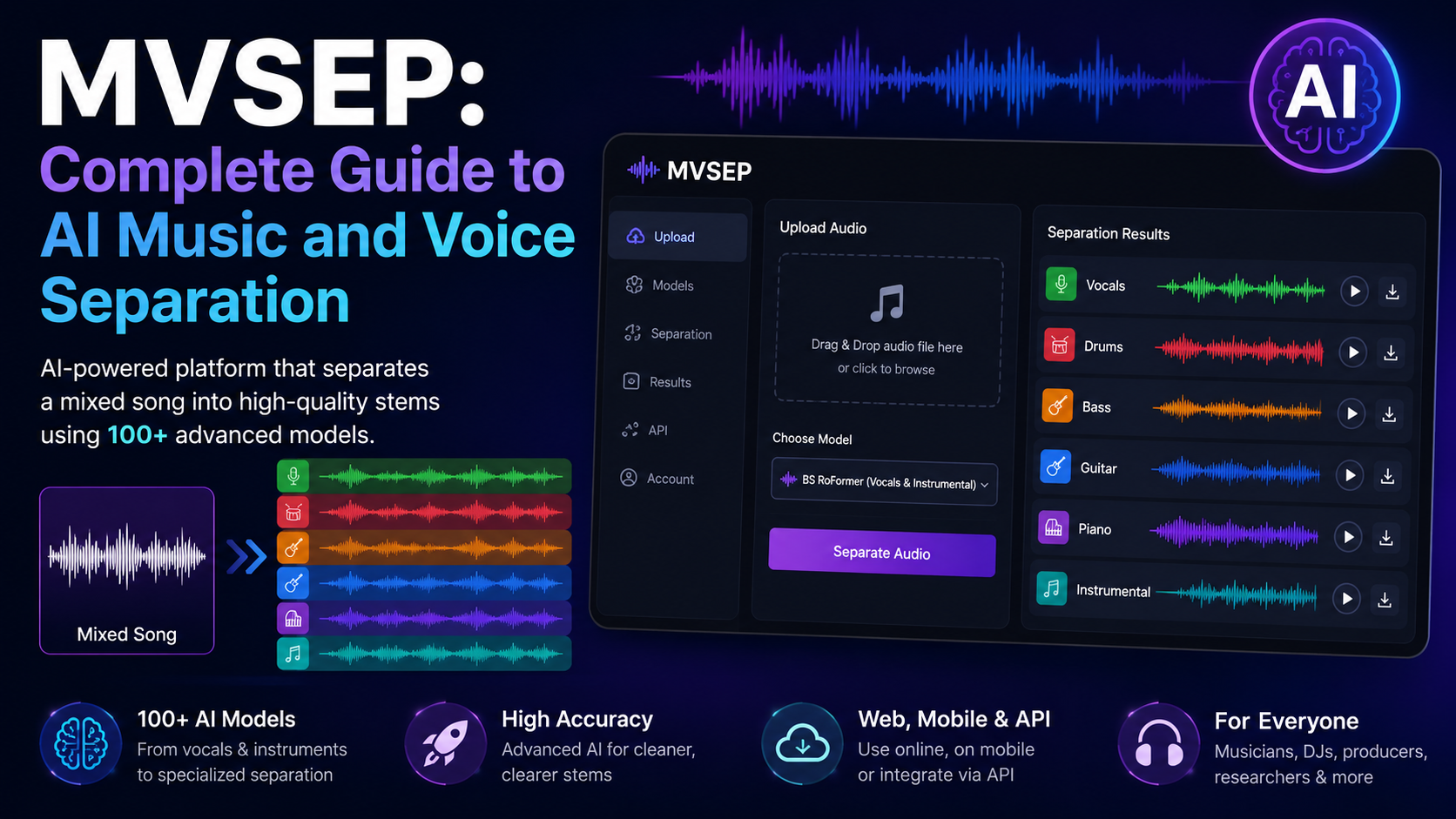
MVSEP is an AI-powered audio separation platform designed to take a finished recording and split it into separate stems such as vocals, drums, bass, guitar, piano, or instrumental music. Unlike a simple vocal-removal filter, MVSEP provides a large collection of different machine-learning models, each designed for particular separation tasks. The current service lists 100+ AI models, ranging from common vocal/instrumental separation to specialized instrument extraction, drum decomposition, choir separation, and multichannel processing.
That distinction is important. MVSEP is not a single AI model. It is a platform that gives users access to many source-separation algorithms through a web interface, mobile apps, and an API. Its current model catalog includes architectures such as BS RoFormer, Mel-Band RoFormer, MDX23C, HT Demucs, and SCNet, along with models built or fine-tuned specifically for instruments and voices.
For musicians, DJs, producers, karaoke creators, remixers, researchers, and audio editors, the practical benefit is straightforward: you can start with a mixed song and recover usable estimates of individual components without having the original multitrack project.
The results are not identical to having the original studio stems. Source separation is an estimation problem, so some bleed, artifacts, distortion, or missing detail can remain. The quality depends heavily on the source recording and, just as importantly, on choosing a model suited to the material.
What Is MVSEP?
MVSEP stands for Music & Voice Separation, and the official service describes itself as a system for separating audio into voice and music components.
At its simplest, MVSEP accepts an audio recording, runs it through an AI separation model on the service’s processing infrastructure, and returns one or more new audio files representing the estimated sources.
For example, a conventional four-stem separation might produce:
| Stem | What it contains |
|---|---|
| Vocals | Lead and/or vocal content, depending on the model |
| Drums | Drum and percussion material |
| Bass | Bass instruments and low-frequency bass content |
| Other | Remaining musical material |
More advanced MVSEP models can go much further. The current BS RoFormer SW model can produce six stems in one pass: vocals, bass, drums, guitar, piano, and other.
There are also specialized models for guitar, piano, bass, synths, percussion, wind instruments, strings, choir, saxophone, flute, trumpet, and other sources. In March 2026, MVSEP announced another group of specialized models, including lead/rhythm guitar, plucked strings, percussion, keys, brass, woodwind, xylophone, celesta, choir, bagpipes, and FX.
So when people search for “MVSEP vocal remover”, they are really looking at one part of a much broader audio-separation platform.
How Does MVSEP Work?
The key idea behind MVSEP is called music source separation.
Imagine a finished song as a single audio mixture:
Song = vocals + drums + bass + guitar + piano + other sounds
When the original multitrack session is available, each of those parts may exist as its own track. But after mixing and mastering, they are combined into one audio signal.
MVSEP attempts to estimate what each source sounded like before the sources were mixed together.
Step 1: The song is converted into a representation the model can analyze
Machine-learning systems commonly analyze audio using a spectrogram, which shows how energy is distributed across frequency and time.
In simple terms:
- The horizontal direction represents time.
- The vertical direction represents frequency.
- The intensity represents how much audio energy is present.
This gives the AI a way to recognize patterns associated with vocals, drums, bass, and other sounds.
Step 2: The neural network identifies source patterns
A trained separation model has learned statistical patterns from many examples of music.
For instance, a model may learn that:
- vocal harmonics have particular time-frequency structures,
- kick drums produce strong low-frequency transients,
- cymbals contain distinctive high-frequency energy,
- bass instruments often have sustained low-frequency patterns,
- guitars and piano have characteristic combinations of harmonics and attacks.
Modern models do not simply look for one fixed frequency range. Different instruments overlap heavily in frequency, so the problem requires understanding patterns over both time and frequency.
Step 3: The model estimates each source
The network produces an estimate for every target stem.
A simplified mathematical way to view the task is:
Here, x(t) is the mixed recording, while s₁(t), s₂(t), … are the estimated individual sources.
The important word is estimated. The AI does not recover a hidden original file that still exists inside the finished MP3. It reconstructs signals that are likely to correspond to the sources.
Step 4: The estimates are converted back into audio
After processing, MVSEP reconstructs playable audio files from those estimates. You can then import the stems into a DAW such as a music-production or video-editing application and process them separately.
This is why source separation is sometimes called AI demixing.
Why Is Music Separation So Difficult?
The biggest misconception about vocal extraction is that vocals occupy one unique frequency range and can simply be filtered out.
They do not.
A singer and a guitar, piano, or snare drum can occupy the same frequencies at the same moment. Reverb can place vocals into the same acoustic space as instruments. Stereo effects can spread sounds across channels. Compression can reduce the differences between sources.
That means the AI is solving a much harder problem than ordinary equalization.
Consider a vocal accompanied by a guitar chord. Both may contain energy around the same midrange frequencies. A traditional EQ cannot confidently tell the two apart. A trained neural network instead tries to recognize the time-frequency structure of the vocal and guitar and estimate how much of each is present.
This is also why separation quality is not uniform across every song.
A clean studio recording with a centered vocal may separate relatively well. A heavily processed track with dense backing vocals, distortion, stereo widening, reverberation, and competing instruments can be considerably harder.
MVSEP Is a Collection of Different AI Models
One of MVSEP’s most important characteristics is its model variety.
The underlying approaches include several well-known research architectures.
BS RoFormer
BS RoFormer, short for Band-Split RoPE Transformer, is a frequency-domain architecture developed for music source separation. It divides the frequency representation into bands and uses Transformer-based processing to model information inside and between those bands. The original research reported first-place performance in the music source separation track of the Sound Demixing Challenge 2023.
MVSEP currently offers BS RoFormer for both vocal/instrumental separation and multi-stem separation. Its BS RoFormer SW model produces six stems in one operation.
Mel-Band RoFormer
Mel-Band RoFormer builds on the RoFormer approach but uses overlapping bands based on the mel scale, a frequency representation influenced by human auditory perception.
The published research found that Mel-RoFormer outperformed the original BS-RoFormer in several MUSDB18HQ separation tasks, including vocals, drums, and other stems.
MVSEP uses Mel-Band RoFormer for vocal/instrumental separation and as part of some specialized systems.
MDX23C
MDX23C is associated with the Sound Demixing Challenge 2023 ecosystem and is based on the TFC TDF v3 architecture developed in the KU IELab work used for the challenge.
MVSEP’s own open-source training repository includes MDX23C, HTDemucs, BS RoFormer, Mel-Band RoFormer, and other architectures.
MVSEP also documents MDX23C models as full-band, meaning the model design does not simply discard the high-frequency portion of the signal.
HT Demucs
Hybrid Transformer Demucs, commonly called HT Demucs, combines time-domain and frequency-domain processing with Transformer components. Research on the architecture showed that adding long-range contextual modeling improved source-separation performance over earlier Hybrid Demucs systems under the study conditions.
MVSEP currently describes Demucs4 HT as a relatively fast option that provides good separation for bass, drums, and other stems.
SCNet and other architectures
MVSEP also includes SCNet and multiple specialized models. This makes the platform different from services that expose only one fixed neural network.
The practical consequence is important: there is no single “MVSEP quality” that applies to every separation. The quality depends on the particular algorithm, model version, target instrument, and source material.
What Can MVSEP Separate?
The current MVSEP catalog extends well beyond the familiar vocal-versus-instrumental task.
Vocals and instrumental music
This remains one of the most common uses. MVSEP currently lists BS RoFormer, BS PolarFormer, MelBand RoFormer, MDX23C, SCNet, MDX-B, Ultimate Vocal Remover-based models, and other options for this type of job.
Multi-stem music
The platform provides models for simultaneous separation of multiple musical components. Current examples include:
Vocals + bass + drums + guitar + piano + other
and four-stem approaches based on Demucs.
Individual instruments
Specialized models can target specific categories including:
- bass
- drums
- piano
- guitar
- synth
- percussion
- strings
- wind instruments
- brass
- woodwind
- choir
- keys
MVSEP’s catalog also contains dedicated models for more specific instruments such as violin, viola, cello, saxophone, flute, trumpet, trombone, organ, accordion, harp, mandolin, sitar, and others.
Drum decomposition
Some models go beyond a general drum stem.
MVSEP’s DrumSep options can divide drums into multiple components such as kick, snare, toms, cymbals, hi-hat, ride, and crash, depending on the model variant.
Lead and backing vocals
MVSEP also provides specialized vocal models intended to separate lead vocals from backing vocals or other vocal components, including its MVSep Karaoke model.
Other specialized tasks
The current platform includes models for such tasks as crowd-sound removal, multi-singer separation, male/female vocal separation, multichannel separation, and other experimental audio-processing tasks.
How to Use MVSEP
For most users, the basic workflow is straightforward.
1. Upload an audio file
The website provides direct file upload, remote upload, and batch-upload functionality.
MVSEP’s current free tiers allow files up to 10 minutes and 100 MB, while Premium supports files up to 100 minutes and 1 GB.
2. Choose the separation type
This is the most important decision.
Do not automatically choose the first model in the list. Think about what you actually want.
For a normal karaoke-style job, select a vocals/instrumental model.
For remixing, a multi-stem model may be more useful.
For extracting a guitar part, a dedicated guitar model can make more sense than a generic four-stem separation.
For drum editing, choose a DrumSep or drum-specific model when appropriate.
3. Select the output format
MVSEP offers different output-quality levels depending on the account type. The current plan information lists MP3 for unregistered users, lossless WAV 16-bit or FLAC 16-bit for registered users, and higher-quality WAV 32-bit float or FLAC 24-bit output under Premium.
For serious editing, lossless audio is generally preferable to repeatedly processing compressed MP3 files.
4. Consider resampling
The interface includes an option related to input that is not 44.1 kHz.
This matters because many music-separation models and training datasets are designed around particular sample-rate assumptions. Resampling does not magically improve the original recording, but providing the model with an appropriate input format can avoid compatibility problems and unnecessary processing differences.
5. Wait for server-side processing
MVSEP is a cloud service, so the heavy AI computation is performed on the platform’s infrastructure rather than requiring the user to install the models locally.
The service exposes multiple regional API endpoints and uses GPU processing for separation workloads.
Processing time can vary according to the model, input duration, server load, and job queue.
Which MVSEP Model Should You Choose?
There is no universally correct model. The right choice depends on your goal.
| Your goal | Good starting point | Why |
|---|---|---|
| Remove vocals | BS RoFormer or MelBand RoFormer | Designed specifically for vocal/instrumental separation |
| Create karaoke tracks | MVSep Karaoke or another vocal-focused model | Tuned toward vocal extraction |
| Split a song into several stems | BS RoFormer SW | Produces six musical stems in one pass |
| Separate standard bass/drums/vocals/other | Demucs4 HT | A relatively fast conventional multi-stem option |
| Extract drums | DrumSep or MVSep Drums | Designed for percussion-focused separation |
| Extract bass | MVSep Bass | Dedicated bass-separation models |
| Extract guitar | MVSep Guitar or Lead/Rhythm Guitar | Designed for guitar-specific targets |
| Extract piano | MVSep Piano | Combines multiple architectures for piano separation |
| Separate specialized instruments | Corresponding MVSep instrument model | More targeted than a generic stem model |
These should be treated as starting points, not universal rankings. MVSEP’s catalog changes as models are updated, and the same model can behave differently on different recordings. The platform itself currently labels models by their intended source type and maintains model-specific quality information.
Why MVSEP Can Produce Different Results From One Model to Another
Two source-separation models can receive exactly the same song and produce noticeably different outputs.
That happens because models can differ in:
Training data. A model trained on one mixture of genres and recording styles may behave differently from one trained on another.
Target definition. One model may be trained to separate “vocals,” while another may target a narrower concept such as lead vocals.
Architecture. BS RoFormer, HT Demucs, MDX23C, SCNet, and related systems solve the separation problem in different ways.
Frequency handling. Some models work in different frequency representations or use different band structures.
Fine-tuning. A general model can be fine-tuned on a specialized dataset to improve a particular instrument or vocal task.
Ensembling. MVSEP can combine results from several models. The idea is similar to asking several specialists for independent estimates and then combining their outputs. MVSEP’s current Premium offerings include ensemble models, and its documentation exposes ensemble configurations that combine multiple separation algorithms.
This can improve quality in some cases, but it can also increase processing requirements and does not guarantee a perfect result.
What Is an Ensemble in MVSEP?
An ensemble combines the outputs of multiple models instead of trusting only one.
Suppose Model A is excellent at preserving vocal tone but leaves a little instrumental bleed. Model B might suppress the instruments more aggressively but introduce a different artifact. Model C could preserve another aspect of the vocal more effectively.
An ensemble can combine these estimates to produce a final result that benefits from several models.
MVSEP currently lists ensemble systems for vocal/instrumental separation, five-stem separation, and broader All-In separation workflows. Its documentation also shows that some ensembles contain combinations of BS RoFormer, MelBand RoFormer, SCNet XL, and other models.
The trade-off is that ensembles can be slower and more computationally expensive than a single model.
What Are Bleed, Artifacts, and Residuals?
Even excellent AI separation is not the same as retrieving the original studio stem.
The unwanted material that remains in an extracted stem is often described as bleed or leakage.
For example, after extracting vocals you may still hear:
- faint drums,
- guitar harmonics,
- reverb tails,
- backing vocals,
- echoes,
- stereo ambience.
You can also hear artifacts created by the separation process itself. These may sound like metallic textures, warbling, watery high frequencies, musical smearing, or transient distortion.
Why does this happen?
Because the AI must make decisions when sources overlap. If a vocal and guitar occupy nearly identical time-frequency regions, the model has to estimate which portion belongs to which source. There is no universal mathematical method that can perfectly reconstruct the original mix from a single stereo recording in every case.
This limitation is fundamental to blind source separation rather than being unique to MVSEP.
What Does SDR Mean in MVSEP?
MVSEP publishes quality measurements for many models using metrics such as SDR, or Signal-to-Distortion Ratio.
SDR is a numerical way of evaluating how closely a separated signal resembles the intended reference signal in a benchmark.
Higher SDR can generally indicate better separation quality within the same evaluation setup, but it should not be treated as a guarantee of what you will hear on a particular commercial song.
This distinction matters because benchmark scores depend on:
- the dataset,
- the evaluation methodology,
- the target stem,
- the exact model version,
- and the characteristics of the test material.
MVSEP publishes separate quality tables for different algorithms and datasets, including MultiSong and challenge-related evaluations.
In other words, an SDR number is useful for comparing systems under controlled conditions, but it is not a universal “quality percentage.”
Can MVSEP Separate Any Song Perfectly?
No.
That is one of the most important facts to understand before using any AI stem-separation tool.
Performance can deteriorate when:
- vocals are heavily reverberated,
- several singers overlap,
- instruments play similar notes,
- distortion is strong,
- the mix is extremely dense,
- stereo effects spread sounds unusually,
- the source is already heavily compressed,
- backing vocals overlap with the lead,
- or the requested target was not well represented in the model’s training data.
A source-separation model can produce impressively clean results while still changing the sound of the target stem.
For professional releases, the original multitrack session remains the authoritative source whenever it is available.
MVSEP Free vs Premium
MVSEP currently offers free unregistered and registered tiers plus a Premium, credit-based option. Premium does not require a recurring subscription according to the current plans page.
| Feature | Unregistered | Registered | Premium |
|---|---|---|---|
| Maximum file length | 10 min | 10 min | 100 min |
| Maximum file size | 100 MB | 100 MB | 1 GB |
| Daily separations | 50 | 50 | Unlimited |
| Concurrent jobs | 1 | 1 | No limit |
| AI models | 100+ | 100+ | 100+ + Ensemble |
| Lossless output | No | Yes | Yes |
| Highest output quality | MP3 | WAV 16-bit / FLAC 16-bit | WAV 32-bit float / FLAC 24-bit |
| Queue priority | Low | Medium | High |
| Batch processing | No | No | Yes |
| API access | No | Limited | Full |
These are the limits listed by MVSEP at the time of writing and can change as the service evolves.
For occasional karaoke or experimentation, the free tier can be sufficient. Users working with long recordings, large batches, high-quality exports, or programmatic workflows have more reason to consider Premium.
Does MVSEP Have an API?
Yes.
MVSEP provides an API for applications that need to automate audio separation rather than sending files through the website manually.
According to the current API documentation, developers can create separations, retrieve results, inspect available algorithms, monitor jobs, access separation history, and use other service functions. Authentication requires an API key.
MVSEP currently operates regional API endpoints in Germany, Germany 2, and Hong Kong, while the main API endpoint uses geographic steering. The documentation recommends choosing a regional endpoint explicitly for integrations and using the same region throughout a job’s lifecycle.
This makes the platform potentially useful for:
DAW integrations, automated media-processing systems, music applications, bots, batch-processing services, and research workflows.
The API also exposes algorithm metadata, so an application can discover which separation types and options are currently available rather than hard-coding a permanently fixed model list.
Is MVSEP Available on Mobile?
MVSEP expanded beyond the website in 2026.
In its March 2026 update, the service announced an iOS app and an updated Android app, along with an automatic-update checker, separation reviews, and bug fixes. The same update announced multiple new specialized instrument models.
That means users who primarily work from a phone are no longer limited to a desktop browser for the core MVSEP experience.
What Happens to Uploaded Audio?
This is an important question whenever a cloud AI service is used for private or unreleased material.
MVSEP’s privacy policy, updated July 29, 2026, states that uploaded files are used to provide the requested processing service and that the service does not claim ownership of uploaded content or generated outputs. The policy also states that uploaded audio and generated outputs are not used to train, fine-tune, or evaluate machine-learning models.
The same policy says the uploaded file as received is deleted after one day, while the processing copy, generated outputs, and processing record are deleted after three days, subject to scheduled deletion and limited exceptions such as legal requirements or certain investigations.
There is also an important geographic consideration: MVSEP states that uploaded content may be processed on infrastructure inside and outside the European Economic Area, and its current privacy policy warns that the service may not be appropriate for organizations requiring a GDPR Article 28 data-processing agreement.
For users working with confidential commercial recordings, unreleased client material, or legally sensitive content, that policy deserves careful attention before uploading anything.
Is MVSEP Safe for Copyrighted Music?
The technical ability to separate a song does not automatically grant permission to use that song.
Copyright and licensing are separate from the technical process.
For example, using separation software to work on a recording you have the rights to edit is fundamentally different from distributing extracted vocals or instrument stems from a copyrighted commercial track without permission.
MVSEP’s privacy policy specifically places responsibility on users to ensure they have the necessary rights and permissions for submitted content.
Therefore, MVSEP should be viewed as an audio-processing technology, not as a license to reuse music.
MVSEP vs Traditional Vocal Removal
Traditional vocal removal often relies on techniques such as center-channel cancellation.
The logic is simple: if vocals are mixed in the center of a stereo recording while some instruments are distributed toward the left and right channels, subtracting one channel from the other can reduce centered material.
The weakness is obvious. Many instruments are also centered, and modern mixes do not follow a strict “vocals in the middle, everything else at the sides” arrangement.
AI source separation is fundamentally different. Neural models use learned patterns to estimate individual sources even when those sources overlap in frequency and stereo position.
That does not mean AI always wins. It means the two methods solve different problems.
MVSEP vs Demucs and Ultimate Vocal Remover
It is useful to understand the relationship between these names.
Demucs is a family of source-separation models.
Ultimate Vocal Remover (UVR) is a software project and ecosystem that provides access to different separation models.
MVSEP is a hosted platform that provides many algorithms and models through its own infrastructure.
They are therefore not necessarily direct equivalents.
MVSEP itself currently offers Demucs4 HT and models associated with the Ultimate Vocal Remover ecosystem alongside BS RoFormer, MelBand RoFormer, MDX23C, SCNet, and models developed specifically for MVSEP.
For an end user, the practical difference is that MVSEP emphasizes centralized access to many models without requiring the user to install and maintain all of those models locally.
Who Should Use MVSEP?
MVSEP is particularly useful when the goal is to obtain editable components from an already-mixed recording.
A music producer can use separated stems for remixing, editing, sampling, or arrangement analysis.
A DJ can experiment with acapellas and instrumentals.
A karaoke creator can generate an instrumental version from a song.
A video editor can isolate dialogue or musical components when the original audio mix is unavailable.
A researcher can compare different source-separation models and their outputs.
A music student can isolate drums, bass, guitar, piano, or vocals to study an arrangement.
A developer can use the API to integrate automated separation into another application.
The greatest value appears when the alternative is having no isolated stem at all.
When MVSEP Is the Wrong Tool
MVSEP is not a substitute for having the original production files.
You should prefer the original multitrack or DAW session when:
- the recording is your own production,
- individual instrument tracks are available,
- you need archive-grade fidelity,
- phase accuracy is critical,
- the isolated stem will be used for a major commercial release,
- or you need guaranteed preservation of the exact original performance.
AI separation creates reconstructions, not perfect historical recovery.
It is also worth avoiding repeated lossy workflows. Separating an MP3, exporting another MP3, editing it, and repeatedly reprocessing the result can compound quality loss.
For serious work, start with the highest-quality source you are legally permitted to use.
How to Get Better MVSEP Results
The model is only part of the equation.
Start with the highest-quality original audio available. A lossless source is preferable to an aggressively compressed file.
Choose the model according to the actual target, rather than always selecting a generic vocal model.
For difficult material, compare two or more model types. Because different architectures make different mistakes, one model may preserve a particular performance more naturally than another.
Listen to the result critically instead of assuming that a high benchmark score guarantees a perfect extraction.
For a professional project, keep the separated output as an intermediate asset rather than immediately replacing the original mix.
And when a model produces unwanted bleed, consider whether a different specialized model or a later cleanup pass would be more appropriate than simply increasing processing intensity.
Common MVSEP Problems and What They Mean
Why did I get a 0-byte output file?
MVSEP’s FAQ says this generally means the processor could not correctly read the input file, often because of a format problem. The service recommends re-encoding the source as WAV, FLAC, or MP3 and trying again.
Why is the upload or download slow?
MVSEP recommends several options, including its mirror site, remote upload, changing the network connection, and certain export or bot-based alternatives.
Large files, network conditions, and server queues can all affect the practical turnaround time.
Why does the separated vocal still contain music?
That is usually source leakage rather than a file error.
The target and unwanted material overlap acoustically, so the model cannot perfectly distinguish them.
Trying another separation model can sometimes help because different models make different trade-offs.
Why does the vocal sound metallic or distorted?
That is typically a separation artifact. The model may be removing or reconstructing overlapping frequency information in a way that changes the original vocal texture.
This is especially noticeable on dense mixes, reverberated vocals, heavily processed recordings, or difficult high-frequency content.
Why does one model sound much better than another?
Different models have different architectures, training data, target definitions, and optimization strategies.
MVSEP’s catalog exists partly because different models are better suited to different separation tasks.
What Makes MVSEP Different From a Basic Vocal Remover?
The defining difference is breadth.
A basic vocal-removal website often performs one task: vocal-versus-instrumental separation.
MVSEP provides a broader platform with:
100+ AI models, specialized instrument models, multi-stem separation, ensembles, mobile applications, model quality information, batch-oriented capabilities, and an API.
It is therefore better understood as a general-purpose AI audio-separation platform rather than a single-purpose karaoke website.
The Future of MVSEP and AI Stem Separation
The direction of the platform in 2026 is clear: more specialized separation rather than only better generic vocal removal.
Recent MVSEP updates have added models targeting individual instrument families, multi-singer and choir tasks, multichannel audio, and increasingly specialized musical sources.
This reflects a broader trend in music AI. Instead of asking only, “Can AI remove the vocals?”, modern source-separation research asks much more specific questions:
Can AI isolate the electric guitar?
Can it distinguish lead and rhythm guitar?
Can it separate different singers?
Can it split drums into individual components?
Can it work with surround or multichannel recordings?
The more specific the target becomes, the more important specialized training data and model design become.
Frequently Asked Questions About MVSEP
Is MVSEP free?
Yes. MVSEP currently provides free unregistered and registered tiers with 50 daily separations, subject to the listed file and concurrency limits. Premium uses prepaid credits and provides higher limits and additional capabilities.
Is MVSEP an AI model?
Not exactly. MVSEP is a platform containing many AI-based audio models and processing systems. Its catalog includes models such as BS RoFormer, MelBand RoFormer, MDX23C, HT Demucs, and SCNet.
Can MVSEP remove vocals from a song?
Yes. Vocal/instrumental separation is one of its core functions, with several dedicated models available.
Can MVSEP separate drums, bass, guitar, and piano?
Yes. MVSEP currently offers both general multi-stem models and dedicated instrument models for these sources.
Does MVSEP produce perfect stems?
No. AI separation is an estimation process and can produce bleed, artifacts, and missing detail. The quality varies with the recording and model.
Does MVSEP work online?
Yes. The primary MVSEP service is web-based, with cloud processing and API access. MVSEP also has mobile applications.
Can developers automate MVSEP?
Yes. MVSEP provides an API that supports creating separations, checking results, discovering algorithms, and other service functions.
Does MVSEP train its AI models on uploaded songs?
According to MVSEP’s current July 29, 2026 privacy policy, uploaded audio and generated outputs are not used to train, fine-tune, or evaluate machine-learning models.
Is MVSEP better than every other separator?
There is no technically defensible universal answer. Separation quality depends on the model, source recording, target stem, and evaluation method. MVSEP’s major advantage is access to a broad collection of different models and specialized workflows, rather than a guarantee that one model will outperform every alternative on every song.
Final Verdict
MVSEP is best understood as a broad AI music source-separation platform rather than a simple vocal remover. Its strength is the combination of many model architectures, specialized instrument extractors, multi-stem workflows, ensemble processing, cloud GPUs, mobile access, and API support.
For ordinary users, the most useful lesson is simple: choose the model based on the sound you want to isolate. A generic vocal model is sensible for karaoke, while a guitar, piano, drum, bass, choir, or multichannel model can be more appropriate for specialized work.
The technology is powerful, but it is not magic. A mixed recording does not contain perfectly recoverable hidden stems, and AI must reconstruct overlapping sounds from incomplete information. The best MVSEP result is therefore the result produced by the right model, the right source file, and realistic expectations about what source separation can recover.
For creators who do not have access to the original multitrack session, that is still a remarkably useful capability—and MVSEP’s expanding model catalog shows how quickly AI-based audio separation is moving beyond the old idea of simply “removing vocals.”
Also Read: “This Action Is Not Allowed With This Security Level Configuration.” in ComfyUI | Fix Explained

1 Comment
Pingback: OpenWrt-Nikki | A Clear Guide to Nikki, Mihomo, Installation, Modes, and Configuration