


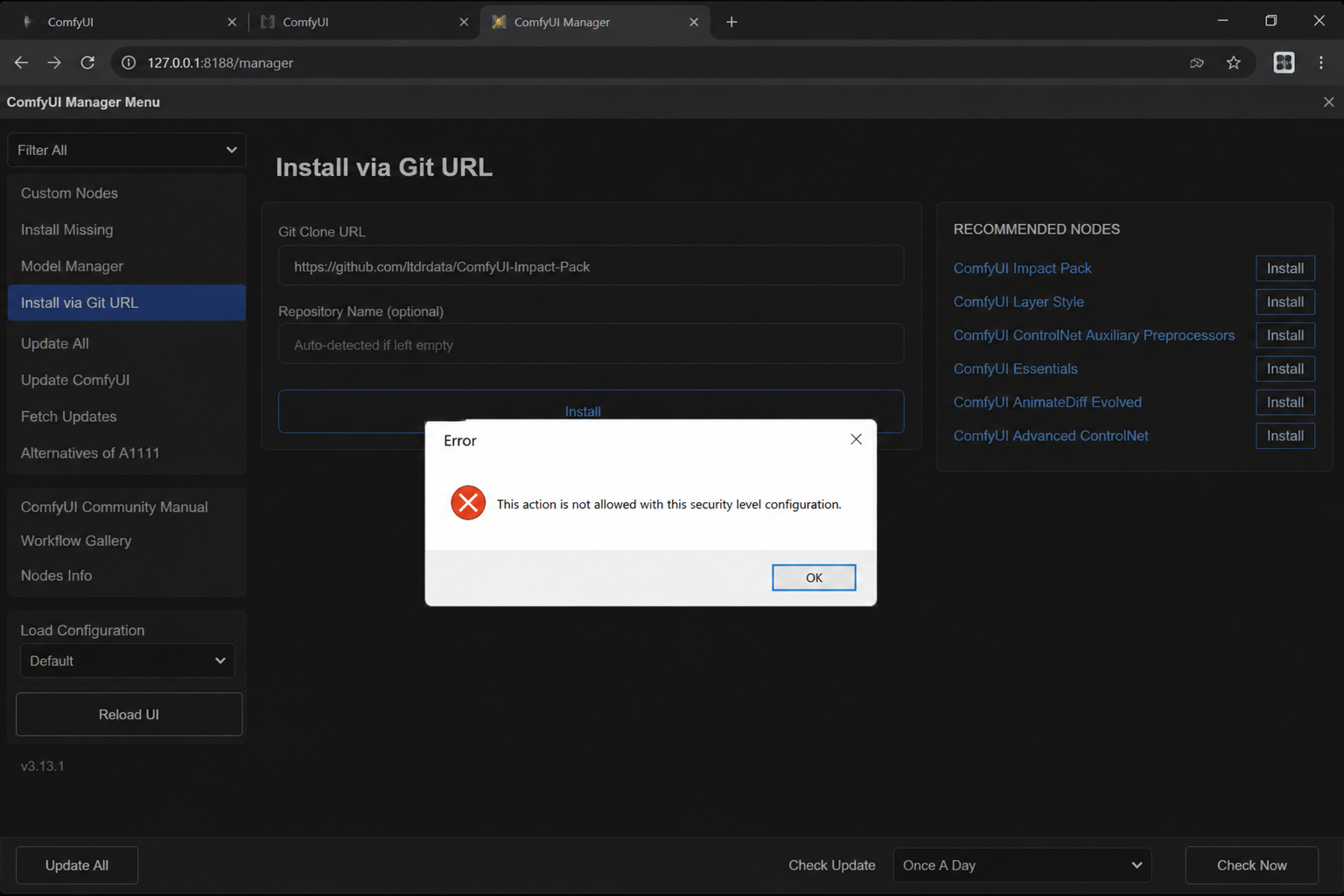
The error “This action is not allowed with this security level configuration.” is most commonly associated with ComfyUI Manager, particularly when you try to install a custom node from a Git URL or use certain Manager features.
The message is not usually a Windows security error. In the current ComfyUI Manager documentation, it is specifically described as a security-policy restriction: the Manager blocks certain potentially risky operations when its configured security level does not permit them.
The good news is that the problem is usually straightforward to diagnose. The important part is not to blindly lower security settings. First determine why ComfyUI is blocking the action and which configuration file your version actually uses.
What the Error Means
In simple terms, ComfyUI Manager is saying:
“The operation you requested is considered too risky for the security level currently configured.”
This can happen when installing a custom node directly from a Git repository, among other Manager operations. Installing a custom node is not merely downloading a picture or ordinary file. A custom node can contain Python code that runs as part of your ComfyUI environment, so allowing arbitrary repositories to be installed has security implications.
ComfyUI Manager therefore has a security-level system that controls which potentially dangerous operations are permitted. The ComfyUI project documents this exact error in connection with installing custom nodes through a Git URL and certain nightly builds.
That means the error itself does not necessarily indicate that ComfyUI is broken. In many cases, the security mechanism is working as designed.
Why ComfyUI Blocks the Action
A ComfyUI custom node is essentially an extension to the application. Depending on what the extension does, it may execute code, communicate with external services, download files, or interact with your local system.
Allowing a user to enter an arbitrary Git repository and install its code automatically therefore creates a larger attack surface.
The Manager’s security policy is intended to place restrictions around these higher-risk operations. A Git URL is particularly important because it can point to repositories that are not necessarily part of ComfyUI’s curated or recognized extension ecosystem.
This is why simply seeing the error does not mean that Git itself is malfunctioning.
A simple example
Suppose you enter:
https://github.com/example/some-comfyui-nodeinto ComfyUI Manager’s Git installation feature.
ComfyUI Manager has to decide whether its current security policy permits installing code from that source. If the configured security level does not permit the operation, Manager stops before installation and displays:
This action is not allowed with this security level configuration.The restriction is therefore related to Manager’s security policy, rather than necessarily being a problem with the repository.
The Most Important Fix: Check config.ini
The official ComfyUI troubleshooting documentation says that this error can be resolved by adjusting the security level in the Manager’s config.ini configuration file. The location depends on the ComfyUI/Manager version.
For ComfyUI v0.3.76 and newer, the current documentation gives this location:
<USER_DIRECTORY>/__manager/config.iniFor older versions, the documented location is:
<USER_DIRECTORY>/default/ComfyUI-Manager/config.iniThe default user directory is generally under the ComfyUI installation’s user directory.
This change in location is important because many older tutorials still tell users to look inside:
ComfyUI/custom_nodes/ComfyUI-Manager/That advice can be outdated for newer installations.
How to Change the Security Level
Before changing anything, make a backup of config.ini. That gives you an easy way to restore the previous configuration.
Open the appropriate config.ini file in a text editor and look for the security-level setting.
You may see something similar to:
security_level = normalThe exact available behavior depends on the Manager version and its security policy.
For an operation that the current policy blocks, ComfyUI documentation and the project’s issue discussions have historically pointed users toward a less restrictive security level, such as:
security_level = weakThe ComfyUI Manager project’s own issue tracker contains reports showing this configuration being used to permit Git-based custom-node installation.
After changing the configuration, save the file and restart ComfyUI.
Do not assume that changing the file while ComfyUI is running will immediately change the Manager’s active security policy.
Why You Should Be Careful With security_level = weak
Changing the setting to a weaker security level can solve the immediate problem, but it also reduces the protection provided by ComfyUI Manager.
That matters because custom nodes are executable software.
A malicious or compromised custom node could potentially pose a much greater risk than an ordinary downloaded image or model file. For that reason, do not install arbitrary Git repositories simply because lowering the security level makes the button work.
A safer approach is to verify the repository first.
Look for:
- The official project repository
- A recognizable developer or organization
- Recent maintenance activity
- Documentation explaining what the node does
- Issues and pull requests that reveal whether the project is maintained
- A reasonable number of users or community references
- No suspicious installation instructions or unexplained scripts
- Compatibility with your ComfyUI version
Security should be treated as part of the installation process, not as an obstacle to remove permanently.
What If config.ini Is Not Where Older Tutorials Say?
This is one of the most common sources of confusion.
Users frequently search:
ComfyUI\custom_nodes\ComfyUI-Manager\and discover that there is no config.ini there.
That does not necessarily mean the file is missing.
The official troubleshooting documentation specifies the newer location under the ComfyUI user directory for current versions.
So if you are using a recent ComfyUI release, check:
ComfyUI\user\__manager\config.inirather than assuming the configuration must be inside custom_nodes.
Older versions may instead use:
ComfyUI\user\default\ComfyUI-Manager\config.iniThe exact directory is therefore version-dependent.
What If the Security Level Is Already Weak?
This is where the problem becomes more interesting.
There are reports in the ComfyUI Manager issue tracker from users who received the same error even after setting security_level to weak.
If that happens, do not keep lowering random Windows security settings. The problem may instead be related to which configuration file ComfyUI is actually loading, the Manager version, the way ComfyUI was launched, or another configuration affecting the operation.
Check these things first.
1. Confirm the configuration file
Make sure you edited the config.ini belonging to the ComfyUI installation you are actually running.
It is surprisingly easy to have multiple ComfyUI installations on one computer.
For example:
C:\ComfyUI\
D:\AI\ComfyUI\
C:\Users\YourName\Desktop\ComfyUI\
Changing the configuration in one installation will not affect another installation.
2. Restart ComfyUI
After changing config.ini, completely restart ComfyUI.
If you have multiple ComfyUI windows or processes running, make sure you are restarting the instance that is actually serving the Manager interface.
3. Check whether ComfyUI was launched with network-access options
A particularly important detail is the way ComfyUI is started.
A historical ComfyUI Manager issue specifically documented a case where launching ComfyUI with:
--listenmade the interface available over the network and triggered additional security restrictions around extension installation.
If you do not need other devices to access your ComfyUI installation, avoid exposing it unnecessarily.
If you do need network access, do not simply weaken security without understanding the consequences.
4. Check the Manager version
The configuration layout and Manager behavior have changed over time.
If you are following a tutorial written for an older ComfyUI Manager release, its instructions may no longer match your installation.
The official troubleshooting documentation specifically distinguishes current and older configuration locations.
Can You Simply Install the Custom Node Manually?
Sometimes a custom node can be installed manually, but that does not automatically make the installation safer.
A typical Git-based installation ultimately places a repository containing executable code into ComfyUI’s custom-node environment.
Therefore, manually cloning a repository does not magically eliminate the security issue. It simply bypasses the Manager interface that was refusing to perform the operation.
If you choose manual installation, you should still verify the repository and understand its installation instructions.
Is the Error Dangerous?
The error itself is not dangerous.
In fact, the restriction can be viewed as a security safeguard.
The potentially dangerous part is what happens if you respond by disabling security controls and then install untrusted code.
Think of it like a locked door:
- The error means the door is locked.
- Lowering the security level unlocks the door.
- The important question is what you allow through it.
If you are installing a reputable custom node from its legitimate repository, temporarily adjusting the Manager security policy may be reasonable depending on your setup.
If the repository is unknown, suspicious, or obtained from an untrusted source, the correct solution may be not to install it at all.
A Safer Troubleshooting Sequence
Rather than immediately changing security settings, use this order:
| Step | What to check | Why it matters |
|---|---|---|
| 1 | Confirm the exact operation | The error can be tied to restricted Manager actions |
| 2 | Identify your ComfyUI/Manager version | Configuration locations differ |
| 3 | Find the correct config.ini | Older tutorials may point to the wrong directory |
| 4 | Check security_level | This determines which operations are permitted |
| 5 | Restart ComfyUI | Configuration changes need to be loaded |
| 6 | Check launch options such as --listen | Network exposure can affect security behavior |
| 7 | Verify the custom-node repository | Custom nodes execute code |
| 8 | Update ComfyUI/Manager if appropriate | Older versions may behave differently |
| 9 | Only then consider lowering security | Avoid weakening protection unnecessarily |
What You Should Not Do
Several common internet fixes are unnecessarily risky or unrelated to the actual problem.
Do not randomly disable Windows Defender, your firewall, Group Policy, or browser security settings just because the error contains the word “security.”
For the ComfyUI Manager version of this message, the relevant security control is ComfyUI Manager’s own security policy, not a generic Windows security-level setting. The official ComfyUI documentation specifically directs users to the Manager’s config.ini.
Likewise, do not modify the Windows registry merely because an unrelated search result suggests it. Generic pages sometimes associate the same English error with completely different Windows technologies, but the meaning depends on the application that produced the message.
What If You Are Using ComfyUI on a Cloud Service?
Cloud environments introduce another complication.
If ComfyUI is running through a hosted platform, container, or managed environment, you may not have the same filesystem or startup configuration as a local Windows installation.
There have also been ComfyUI Manager reports from cloud users who changed config.ini but continued to encounter security restrictions.
In such environments, check:
- Which ComfyUI instance is actually running.
- Where its user directory is located.
- Which Manager version is installed.
- Whether the platform starts ComfyUI with additional command-line arguments.
- Whether the platform recreates or overwrites configuration files when the instance restarts.
A configuration change that works on a local portable installation may not behave identically in a managed cloud environment.
Does Updating ComfyUI Fix the Error?
Sometimes, but not necessarily.
The official documentation treats the message primarily as a security-policy issue and recommends adjusting the relevant Manager configuration when the restricted operation is genuinely intended.
However, keeping ComfyUI and ComfyUI Manager reasonably current is still important because configuration paths, Manager behavior, and supported features can change.
If your installation is old and you are following instructions written for a newer release—or vice versa—updating may also eliminate confusion caused by outdated instructions.
The key point is that an update is not a substitute for understanding the security setting.
Frequently Asked Questions
What does “This action is not allowed with this security level configuration.” mean in ComfyUI?
It generally means ComfyUI Manager’s security policy does not permit the operation you attempted. It is particularly associated with restricted actions such as installing custom nodes through a Git URL.
Where is ComfyUI Manager’s config.ini?
For ComfyUI v0.3.76 and newer, the official troubleshooting documentation lists:
<USER_DIRECTORY>/__manager/config.iniOlder versions use:
<USER_DIRECTORY>/default/ComfyUI-Manager/config.iniShould I change security_level to weak?
Only if you understand why the operation is being blocked and trust the code you intend to install. A weaker security policy allows more potentially risky operations, so it should not be treated as a harmless permanent setting.
Why can’t I find config.ini inside custom_nodes\ComfyUI-Manager?
You may be using a newer ComfyUI Manager version. The official documentation moved the documented configuration location for newer versions into the ComfyUI user directory.
Does this error mean my computer has a virus?
No. The message by itself does not indicate malware. In the ComfyUI Manager context, it is a deliberate security-policy message.
Why does the error appear when I install a Git URL?
A Git URL can point to arbitrary third-party code. ComfyUI Manager therefore applies security restrictions to this type of installation. The project’s own issue tracker documents this exact scenario.
What if the error remains after setting security_level = weak?
Check that you edited the configuration used by the running ComfyUI instance, restart ComfyUI, verify the Manager version, and examine how ComfyUI was launched. There are documented cases where users continued to see the error despite apparently changing the security level.
Bottom Line
If ComfyUI shows “This action is not allowed with this security level configuration.” the first thing to understand is that this is generally a ComfyUI Manager security-policy restriction, not a generic Windows error.
For current ComfyUI versions, start by checking the Manager’s documented config.ini location, verify the configured security level, and restart ComfyUI after making any legitimate configuration change.
Most importantly, do not treat lowering the security level as the entire fix. The real security question is whether the custom node or Git repository you are trying to install is trustworthy. Because custom nodes can execute code inside your ComfyUI environment, verifying the source is just as important as getting the installation button to work.
Also Read: No Module Named ‘sageattention’ | How to Fix the Error

1 Comment
Pingback: MVSEP: Complete Guide to AI Music and Voice Separation