


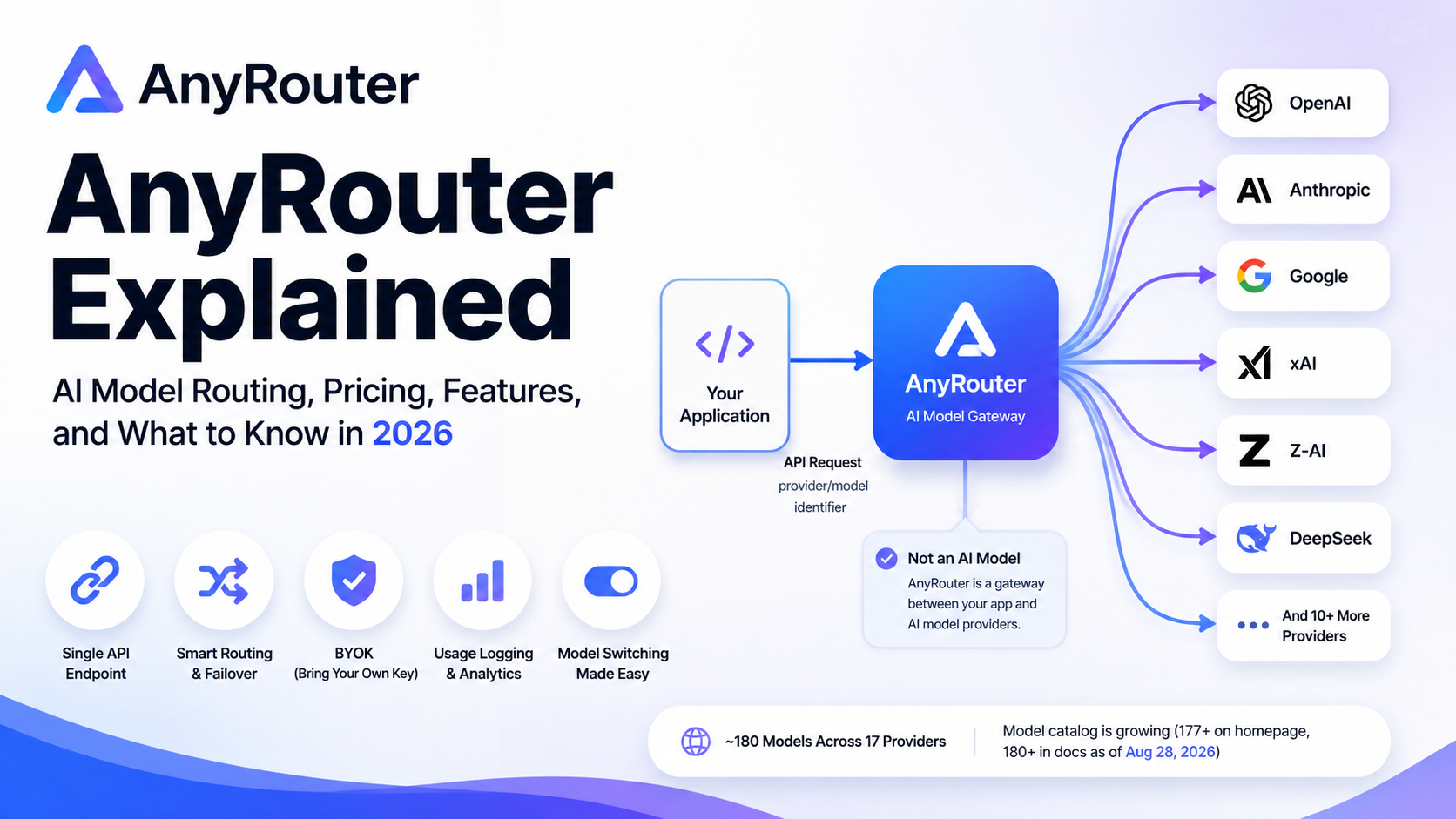
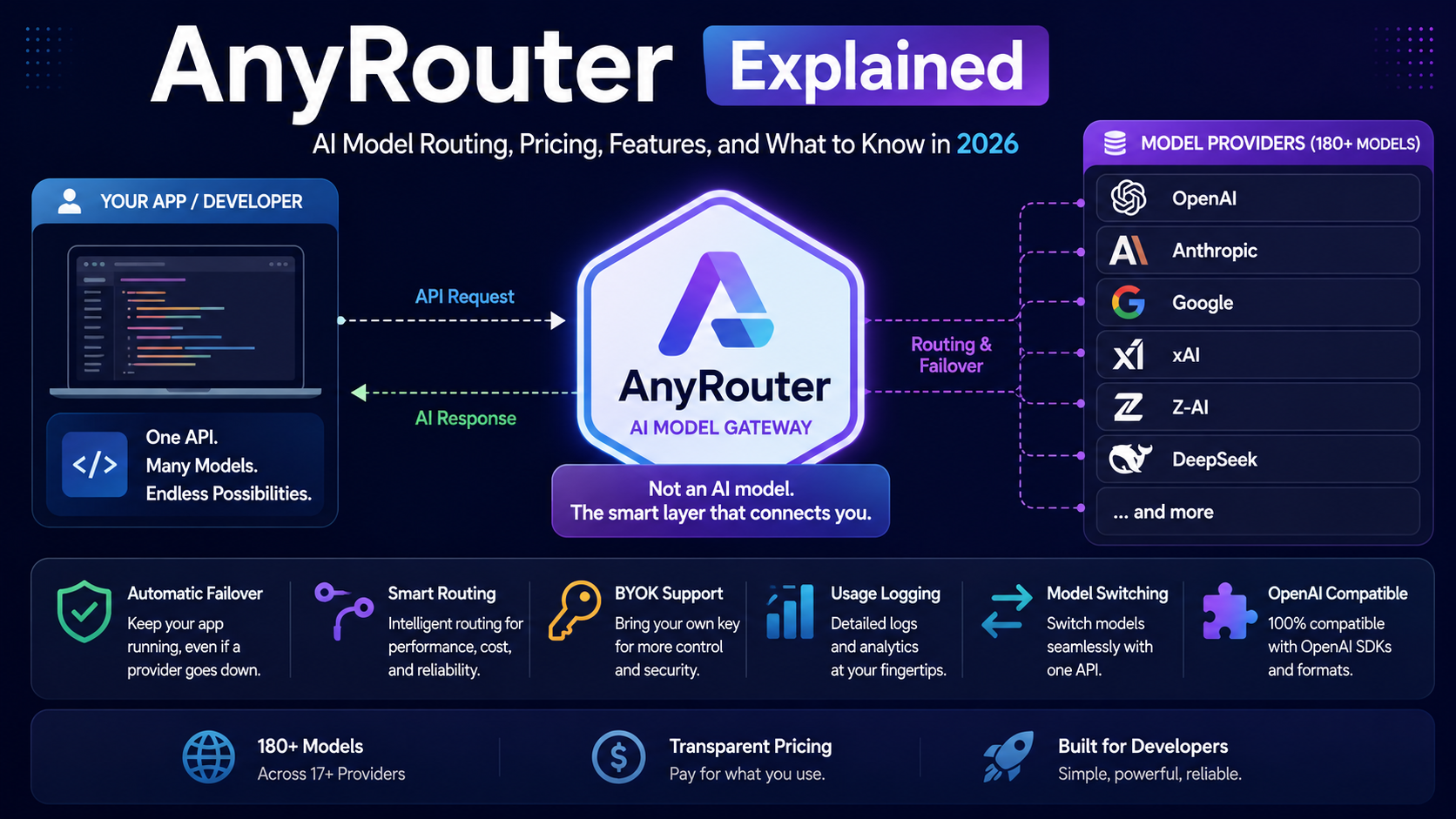
AnyRouter is a developer-focused AI model gateway that puts many AI models behind a single API endpoint. Instead of integrating separately with OpenAI, Anthropic, Google, xAI, Z-AI, DeepSeek, and other providers, developers can send requests to AnyRouter and select models with a provider/model identifier. The service then handles the connection to an appropriate upstream provider, with features such as automatic failover, routing, BYOK, usage logging, model switching, and API compatibility.
The important distinction is that AnyRouter is not itself an AI model. It is the layer between your application and the companies that actually run the models. AnyRouter’s own terms explicitly describe it as a gateway rather than the model author, and the selected upstream provider remains responsible for generating the response.
As of August 28, 2026, AnyRouter’s website describes a catalog of roughly 180 models across 17 providers. The homepage currently displays 177+ models, while the documentation rounds the catalog to 180+, so the exact number is changing as models are added and removed.
What Is AnyRouter?
At its simplest, AnyRouter is an AI traffic-routing layer.
Imagine an application that needs to use five different AI services. Without a gateway, the application may need five separate API integrations, five authentication schemes, different request formats, different error handling, and separate billing records.
With AnyRouter, the application can use one base URL:
https://anyrouter.dev/api/v1and identify a model such as:
anthropic/claude-sonnet-4.6The basic programming model remains compatible with the OpenAI API, meaning an existing OpenAI-compatible application can often be moved by changing the base URL, API key, and model identifier rather than rewriting its entire AI integration.
That makes AnyRouter particularly interesting for AI applications, coding agents, multi-model applications, testing environments, and teams that do not want their software tightly coupled to one model provider.
How AnyRouter Works
The easiest way to understand AnyRouter is to follow one request.
Suppose an application sends a request for a Claude model. The request first reaches AnyRouter rather than Anthropic directly.
The gateway authenticates the request, identifies the requested model, considers the available upstreams and any routing preferences, and then selects an upstream destination. Depending on the configuration, AnyRouter can consider provider priority, cost, latency, load balancing, BYOK eligibility, compliance restrictions, and health information before sending the request onward.
If the selected provider fails, AnyRouter can move to another eligible upstream. That is one of the most important differences between a router and a simple API forwarding service.
A simplified flow looks like this:
Your application
       ↓
AnyRouter API
       ↓
Routing decision
       ↓
Primary upstream
       ↓
AI model provider
       ↓
Response
       ↓
Your application
When failures occur, the practical flow can become:
Application
    ↓
AnyRouter
    ↓
Provider A ── failure ──→ Provider B ──→ Response
The goal is to make a provider outage, rate limit, or transient error less likely to become an application-wide failure.
What Does “AI Model Router” Actually Mean?
A model router is software that decides where an AI request should go.
There are two separate decisions that are easy to confuse.
The first is model selection. You might choose Claude, GPT, Gemini, DeepSeek, or another model because of its capabilities or price.
The second is upstream selection. A single model may be available through more than one backend or provider route. The router can then decide which eligible route should receive the request.
This distinction matters because you can ask for one model while allowing the infrastructure underneath it to select among multiple possible upstreams. AnyRouter’s routing documentation describes strategies including latency, cost, weighted round robin, fixed priority, random selection, and A/B testing.
For a developer, that means the application can express something closer to:
“Use this model, but choose an available and suitable route.”
rather than:
“Send every request to this one endpoint and hope it stays healthy.”
Automatic Failover Is One of AnyRouter’s Most Important Features
Failover means switching to another available backend when the first backend cannot successfully handle a request.
This matters because cloud AI providers can experience rate limits, outages, overloaded infrastructure, temporary errors, or configuration problems. If an application talks directly to one provider, handling those conditions becomes the application’s responsibility.
AnyRouter has a fallback chain that can contain a primary candidate followed by additional candidates. The gateway evaluates configured upstreams, removes backends that are in cooldown, and tries the next eligible backend when a request fails.
AnyRouter also describes circuit breakers as part of this system. A circuit breaker is a mechanism that temporarily stops sending traffic to a backend that is repeatedly failing.
Its documented defaults include a five-failure threshold, a 60-second recovery timeout, up to three half-open probe calls, two successful calls to close the breaker, and up to two retries with exponential backoff beginning at one second. AnyRouter also maintains escalating cooldowns for repeatedly failing backends.
That architecture is useful because constantly retrying a broken provider can make the problem worse. A healthy routing system should stop wasting requests on an upstream that is clearly unhealthy.
Does failover guarantee that every request succeeds?
No.
Failover reduces the impact of upstream failures; it does not eliminate them. If every eligible provider is unavailable, the request can still fail. The service’s own terms also make clear that AnyRouter does not guarantee uninterrupted operation, specific models, providers, or results.
AnyRouter’s OpenAI-Compatible API
One of AnyRouter’s biggest practical advantages is API compatibility.
Its main endpoint is:
https://anyrouter.dev/api/v1An OpenAI-compatible SDK can generally be configured to use that base URL while keeping familiar request structures. AnyRouter documents support for Chat Completions, Responses, Embeddings, and other API surfaces.
A basic Python example looks like this:
import os
from openai import OpenAI

client = OpenAI(
    base_url="https://anyrouter.dev/api/v1",
    api_key=os.environ["ANYROUTER_API_KEY"],
)

response = client.chat.completions.create(
    model="anthropic/claude-sonnet-4.6",
    messages=[
        {"role": "user", "content": "Explain recursion simply."}
    ],
)

print(response.choices[0].message.content)
The important part is not the exact code. It is the architecture: an existing OpenAI-style application can change its provider without replacing its entire client stack.
That portability can be valuable during model migrations, testing, price comparisons, or changes in provider availability.
AnyRouter Also Supports Anthropic-Compatible Requests
AnyRouter is not limited to OpenAI-style applications.
It provides an Anthropic-compatible Messages API at:
https://anyrouter.dev/api/v1/messagesThat means software designed around Anthropic’s Messages protocol can target AnyRouter by changing the API destination and authentication settings. The documentation specifically lists tools such as Claude Code and the official Anthropic SDK among the clients that can use this interface.
An interesting part of the implementation is that the Messages endpoint is not restricted to Anthropic models. AnyRouter says non-Anthropic models can be translated between the Anthropic Messages format and the underlying Chat Completions dialect, allowing Anthropic-style clients to interact with a wider catalog.
That is a powerful abstraction: the client protocol and the model provider do not necessarily have to be the same vendor.
What Is BYOK in AnyRouter?
BYOK means Bring Your Own Key.
Instead of paying AnyRouter to provide managed upstream capacity, you connect your own provider credentials. For example, a developer may already have an OpenAI, Anthropic, Google, Groq, Mistral, DeepSeek, xAI, or Z-AI account.
AnyRouter can then route matching requests through that account.
According to its BYOK documentation, those requests do not consume AnyRouter credits, and the developer continues paying the upstream provider under that provider’s own pricing arrangement. AnyRouter says it adds no markup to BYOK traffic.
This creates two distinct usage models:
| Usage model | Who provides the upstream access? | How it is billed |
|---|---|---|
| Managed capacity | AnyRouter | AnyRouter credits |
| BYOK | You | Your provider account |
The advantage of BYOK is straightforward: you can use AnyRouter as the control layer without paying twice for the model access.
It can also be useful when you already have provider-specific contracts, credits, regional arrangements, or access to a model that you cannot easily obtain through a third-party marketplace.
Can multiple keys be combined?
Yes. AnyRouter documents several strategies for multiple keys belonging to the same provider, including fallback, round robin, weighted distribution, and random selection.
That turns AnyRouter into more than a model switcher. It can also act as a credential and capacity management layer.
AnyRouter’s Shared Key Pool
One of the more unusual parts of AnyRouter is its shared key pool.
Users can voluntarily contribute eligible provider keys to the community pool. Requests from other users can then be served through donated capacity. In return, contributors can receive AnyRouter credits based on usage through their donated keys.
This is important to understand carefully.
A donated key is not simply “sharing a login.” It is giving AnyRouter permission to route other users’ eligible requests through that provider credential. Because that can conflict with a provider’s own terms, AnyRouter explicitly tells users to donate a key only when the provider’s terms permit third-party use.
The service also makes participation opt-in and allows a user to remove the donation setting.
AnyRouter currently advertises up to 8% credit back for qualifying donated-key traffic, with the rate depending on the plan.
For security and contractual reasons, this is one feature users should understand before enabling rather than treating it as a generic “free AI” switch.
Is AnyRouter Free?
The answer is yes and no, depending on what you mean by free.
AnyRouter currently has a Free plan, but the Free plan does not include normal monthly inference credits. It does allow BYOK, and users can purchase pay-as-you-go credits without subscribing. The separately provided anyrouter/free model tier requires Go or another qualifying route.
The current pricing structure is:
| Plan | Price | Included monthly credits | Free-model allowance |
|---|---|---|---|
| Free | $0 | None | Not included |
| Go | $2/month | $4 | 1,000 requests/day |
| Pro | $10/month | $20 | 1,000 requests/day |
| Pro+ | $45/month | $100 | 1,000 requests/day |
| Max | $100/month | $300 | 1,000 requests/day |
These prices are current according to AnyRouter’s pricing documentation as of August 2026. The checkout amount can be higher because payment processing fees and applicable taxes are added by Polar, AnyRouter’s merchant of record.
What does the Go plan actually provide?
The $2 Go plan includes $4 of monthly credits, access to the free-model tier, shared-pool access, one workspace, seven-day logs, and a published paid-model rate limit of 60 requests per minute. Go also places a 3,000-request-per-five-hour usage cap on paid-model traffic.
There is another route to Go: donating at least one eligible provider key can unlock Go without the subscription payment.
What Are AnyRouter Credits?
AnyRouter uses prepaid credits for managed inference.
The system tracks token usage from the upstream model and deducts the appropriate amount from the account’s balance. Monthly plan credits and purchased top-up credits are kept in separate buckets, with monthly credits consumed first. Purchased top-up credits do not expire according to the current documentation.
The company says it does not add an AnyRouter fee to the per-token inference price. The displayed model prices are based on catalog pricing, while subscription checkout and payment processing are handled separately.
For developers, this separation is useful because it distinguishes:
subscription cost from actual model consumption.
A monthly plan does not mean every request is unlimited. Instead, the plan provides included credits and higher service limits, while pay-as-you-go credits can cover additional usage.
What Models Does AnyRouter Support?
The catalog is continuously changing, so quoting a static list would become outdated quickly.
As of late August 2026, the service lists models from providers including OpenAI, Anthropic, Google, Meta, Mistral, DeepSeek, xAI, Groq, Qwen, Cohere, Z-AI, and Cloudflare, among others. The homepage says the catalog has 177+ models across 17 providers, while the documentation uses the rounded 180+ figure.
One reason the catalog changes rapidly is that AnyRouter is actively adding, renaming, disabling, and replacing model routes.
For example, on August 26, 2026, AnyRouter announced that its stealth/ox-alpha preview was officially identified as Z-AI’s GLM-5.3-Flash, with the new public catalog identifier:
z-ai/glm-5.3-flashAnyRouter says the model has a 1-million-token context window, multimodal capability, and a 320B-A18B architecture under the MIT license. The previous ID remains for historical references but is no longer presented as the normal catalog identifier.
This illustrates why developers should generally use the live model catalog instead of hard-coding assumptions based on an old article or screenshot.
AnyRouter and Coding Agents
AnyRouter has expanded beyond the traditional API gateway model into tools for AI coding agents.
Its CLI can launch tools such as Claude Code, Codex, and Grok through the gateway. The current CLI is distributed as a native binary for Linux, macOS, and Windows, with a documented installation path that does not require Node.js.
The CLI is useful when developers want to switch models without repeatedly editing environment variables or manually changing agent configuration.
For example, the documentation shows patterns such as:
anyr claudeor selecting a specific model with:
anyr claude --model "anthropic/claude-sonnet-4.6"The purpose is simple: keep the coding agent while changing the model or routing layer underneath it.
What Is the AnyRouter Local Relay?
The Local Relay feature takes the gateway concept in the opposite direction.
Instead of AnyRouter sending a request to a public cloud model provider, you can run a model on your own computer and let AnyRouter reach that model through an outbound connection.
The documented local targets include:
Apple Foundation Models, Ollama, LM Studio, llama.cpp, vLLM, and other servers that expose a compatible API.
The architecture works roughly like this:
Your application
       ↓
AnyRouter
       ↓
Outbound relay connection
       ↓
Your computer
       ↓
Local AI model
The key security property is that the computer creates an outbound connection. According to AnyRouter’s documentation, there is no need for port forwarding or exposing a public IP address.
This is especially interesting for Apple’s on-device Foundation Model. AnyRouter describes that integration as running the model on the user’s own Apple Silicon Mac while using AnyRouter as the relay and API layer.
The trade-off is equally important: your computer becomes part of the infrastructure. Performance depends on the local hardware, the model, and the device’s availability.
Privacy: Does AnyRouter See Your Prompts?
This is one of the most important questions to ask about any AI gateway.
AnyRouter’s current privacy policy says it does not store prompt and completion bodies by default. Instead, the system records request metadata needed to operate the service, including the model ID, selected provider, token counts, latency, status code, timestamp, request IP address, and other operational information.
However, that does not mean your prompt magically bypasses the gateway.
AnyRouter still has to forward request content to the selected upstream provider. The upstream provider therefore receives the request body and applies its own privacy and data-handling policies. AnyRouter’s privacy policy explicitly says provider-specific practices still matter.
This distinction is critical:
“Not stored by AnyRouter by default” is not the same as “never seen by any service.”
There is also an optional request/response logging feature. When enabled, AnyRouter says it can store complete payloads, including messages, tool calls, and attached images, subject to the configured retention period.
For higher-privacy use cases, the platform offers zero-data-retention controls on its current plans, and some paid plans advertise ZDR as part of the subscription.
How Secure Is AnyRouter?
AnyRouter says that data in transit is protected using TLS 1.2 or higher, while sensitive credentials such as BYOK keys are encrypted at rest. Its infrastructure runs on Cloudflare Workers, with production access restricted and logged according to its privacy documentation.
The service also says BYOK credentials are encrypted at rest and that plaintext provider credentials are available only in memory at the point a request is forwarded.
Those are meaningful security controls, but they should not be interpreted as a guarantee of perfect security. Any gateway adds another trust layer between an application and its AI provider.
That leads to a practical rule:
Treat an AnyRouter API key as a sensitive production credential.
Do not commit it to source control, do not put it into public client-side code, and rotate it if you believe it has been exposed. AnyRouter’s own terms make the same basic recommendation.
What Is the AnyRouter Architecture?
AnyRouter says its gateway runs on Cloudflare Workers, rather than as one traditional always-on server.
A Cloudflare Worker is an isolated execution environment that handles requests at the edge. According to AnyRouter’s engineering documentation, this architecture has shaped the service’s design around constraints such as a 128 MB memory ceiling and a 3 MiB compressed script-size limit per Worker.
That helps explain why AnyRouter emphasizes streaming.
Instead of waiting for an entire AI response and then forwarding it, the gateway streams response data incrementally. This is especially important for long-running language-model responses because buffering a very large response would consume unnecessary memory.
AnyRouter also describes a multi-Worker design in which different components handle the web interface, API execution, dashboard, MCP server, and background workflows.
For users, most of this is invisible. For developers evaluating the platform, however, it explains why the service can combine edge routing, streaming, APIs, dashboards, and routing logic without depending on a conventional single-server architecture.
Does AnyRouter Add Latency?
Any gateway adds another network and processing layer, so it would be misleading to say that routing is literally free in latency terms.
The more useful question is whether the overhead is significant relative to the model’s own generation time.
AnyRouter’s engineering discussion says the routing operation involves selecting an upstream and reading routing state, while the much longer portion of many AI requests is model generation itself. The service also streams responses instead of buffering them, which reduces the chance that the gateway itself becomes a large serialization delay.
But there is an important caveat:
There is no universal latency number that applies to every AnyRouter request.
Actual performance depends on your geographic location, network path, chosen model, upstream provider, traffic conditions, routing policy, and whether failover occurs. A benchmark from one location should not be presented as a universal measure of the platform.
AnyRouter for Developers: Main Advantages
The strongest reasons to consider AnyRouter are architectural rather than purely promotional.
One integration for many models
A single API surface can reach many providers, which reduces the amount of provider-specific code an application has to maintain.
Automatic failover
Applications can avoid depending entirely on one provider endpoint and can fall back when an eligible upstream encounters failures or rate limits.
BYOK support
Existing provider accounts can be routed through the same gateway without consuming AnyRouter inference credits, while AnyRouter says it adds no markup to BYOK traffic.
Model portability
An application can change model identifiers without rebuilding its entire provider integration.
Operational visibility
The platform exposes request-level logs and usage information, including routing and token-related data, making it easier to investigate failures and spending.
Agent tooling
The CLI, MCP integration, presets, prompts, and related tooling are aimed at developers who use AI coding agents and multi-tool workflows rather than only conventional application APIs.
What Are the Disadvantages of AnyRouter?
AnyRouter also introduces trade-offs that should not be ignored.
You add another dependency
Instead of:
Application → OpenAIyou now have:
Application → AnyRouter → ProviderIf AnyRouter itself experiences a service problem, configuration issue, or account problem, it becomes another dependency that your application must consider.
Provider behavior still matters
AnyRouter cannot make an upstream provider’s model perfect or guarantee the same behavior across every provider. Its terms explicitly state that providers can change models, pricing, availability, or limits.
Compatibility is not magic
OpenAI-compatible APIs make migrations easier, but different models can still behave differently around tool calling, structured output, context handling, multimodal inputs, reasoning controls, and other advanced features.
A successful API connection does not automatically mean feature-for-feature behavioral compatibility.
Privacy depends on the full request path
Even if AnyRouter does not retain request bodies by default, the selected upstream provider still receives the request. Sensitive workloads therefore require attention to both AnyRouter’s policy and the provider’s policy.
Pricing can become complicated
The service combines subscriptions, monthly credits, pay-as-you-go top-ups, BYOK, free models, and shared-pool mechanics. This gives developers flexibility, but it also means users should understand which bucket a particular request is consuming.
AnyRouter vs Direct Provider APIs
The choice is not automatically “AnyRouter is better.”
For a very simple application using only one provider, direct access can be easier. The architecture is straightforward, the provider is known, and there is no additional routing layer.
AnyRouter becomes more compelling when the application needs multiple providers, failover, model experimentation, key pooling, centralized logs, or a consistent API layer.
| Scenario | Direct API | AnyRouter |
|---|---|---|
| One model, one provider | Simple | More infrastructure than necessary |
| Multiple model providers | Multiple integrations | One gateway |
| Automatic upstream failover | Usually your responsibility | Built into routing |
| BYOK across providers | Separate implementations | Centralized |
| Model switching | Provider-specific | Common gateway interface |
| Centralized usage visibility | Usually fragmented | Unified |
| Lowest architectural complexity | Strong advantage | More moving parts |
The right choice depends on whether the routing and portability benefits justify adding another service layer.
AnyRouter vs OpenRouter
AnyRouter and OpenRouter occupy a similar category: both are multi-model AI gateways built around the idea of accessing many models through a common API.
The main differences are in their individual pricing models, routing controls, BYOK capabilities, tooling, free-tier mechanisms, and service architecture.
AnyRouter specifically emphasizes $0-markup BYOK, automatic failover, shared donated-key infrastructure, local relay support, CLI tooling, and Cloudflare-based edge architecture.
AnyRouter also documents migration from OpenRouter as a relatively small change because it accepts the same general provider/model style identifiers and OpenAI-compatible request structure.
That does not mean the platforms are identical. Developers should compare the current model availability, actual pricing, provider controls, privacy requirements, operational limits, and compatibility of the specific models they intend to use rather than selecting a gateway solely from headline features.
Who Should Use AnyRouter?
AnyRouter makes the most sense for developers who have one or more of these requirements:
Multi-model applications. You want to test or operate several AI providers without building separate integrations for each one.
Coding agents. You want to run Claude Code, Codex, or similar tools while being able to change the model or provider underneath the agent.
Reliability-sensitive applications. You do not want one upstream provider’s rate limit or temporary outage to automatically become your application’s outage.
Existing provider accounts. You already pay several providers and want centralized routing through BYOK.
AI experimentation. You want one environment for trying different models, prices, context windows, and capabilities.
It is less compelling for a tiny application that calls one provider occasionally and has no need for model switching or failover.
How to Get Started With AnyRouter
The basic setup is intentionally simple.
First, create an AnyRouter account and generate an inference API key. AnyRouter’s current key format uses the sk-ar- prefix.
Next, configure your existing OpenAI-compatible client to use:
https://anyrouter.dev/api/v1Finally, select a model using the current provider/model identifier from the live catalog.
A first request can be as simple as:
curl https://anyrouter.dev/api/v1/chat/completions \
  -H "Authorization: Bearer $ANYROUTER_API_KEY" \
  -H "Content-Type: application/json" \
  -d '{
    "model": "z-ai/glm-4.7-flash",
    "messages": [
      {
        "role": "user",
        "content": "Explain what an API gateway does."
      }
    ]
  }'
The documentation describes the same setup for Python and JavaScript SDKs.
For production systems, keep the API key in an environment variable or secret manager rather than placing it directly in source code.
Is AnyRouter Safe for Production?
There is no responsible way to answer this with a simple “yes.”
AnyRouter has documented security and privacy controls, production routing infrastructure, credential encryption, TLS, zero-retention options, and operational logging.
But production suitability depends on what you are sending through it and which upstream providers are allowed to receive that traffic.
For normal application data, the gateway can be a practical abstraction layer.
For highly sensitive or regulated information, organizations should review:
data retention settings, provider policies, data residency requirements, contractual terms, key management, logging configuration, and whether the selected upstream is permitted to handle the information.
The important thing is to evaluate the entire data path, not just the gateway itself.
What Has Changed Recently?
AnyRouter is a relatively new service, and its development pace is high.
The platform launched publicly in June 2026 and has since added or expanded features such as BYOK, shared-key pooling, the CLI, local model relaying, and expanded model support.
Recent developments include:
GLM-5.3-Flash: The Ox Alpha preview was formally identified and relabeled as Z-AI’s GLM-5.3-Flash on August 26, 2026.
Local AI relay: AnyRouter can now relay traffic to models running directly on a user’s machine, including Apple’s Foundation Model, Ollama, and LM Studio.
Developer CLI: The native anyr CLI is designed to simplify agent setup, authentication, model selection, and multi-tool workflows.
Shared provider pool: Users can optionally contribute eligible provider capacity to a community pool and earn credits back.
These changes show that AnyRouter is evolving from a basic LLM API router into a broader platform covering APIs, agents, local inference, model discovery, credentials, and developer tooling.
Frequently Asked Questions About AnyRouter
What is AnyRouter used for?
AnyRouter is mainly used as a single API gateway for multiple AI models and providers. Developers can use it to simplify integrations, switch models, centralize usage, and add automatic failover.
Is AnyRouter an AI model?
No. AnyRouter is a routing and gateway service. The actual model response is generated by an upstream provider or, in the local-relay case, a model running on your own device.
Does AnyRouter support OpenAI-compatible APIs?
Yes. Its primary API is OpenAI-compatible, with the documented base URL https://anyrouter.dev/api/v1.
Does AnyRouter support Claude?
Yes. Anthropic models are available through the catalog, and AnyRouter also provides an Anthropic-compatible Messages API for clients such as Claude Code.
Is AnyRouter free?
There is a free account tier and a separate free-model system, but the current Free plan does not include general inference credits. The Go plan is $2/month and includes $4 in monthly credits plus access to free-tier models with a 1,000-request-per-day allowance.
Can I use my own OpenAI or Anthropic API key?
Yes. AnyRouter supports BYOK, allowing supported provider accounts to be routed through the gateway. AnyRouter says those requests do not consume AnyRouter credits and are not subject to an AnyRouter markup.
Does AnyRouter store prompts?
By default, AnyRouter says it does not store prompt and completion bodies. It does retain operational metadata, and users can explicitly enable body logging. The upstream provider still receives the request body when serving the request.
Can AnyRouter automatically switch providers when one fails?
Yes. Automatic fallback is a core feature, and the service documents routing chains, retries, circuit breakers, and cooldowns for unhealthy upstreams.
Can AnyRouter connect to a local AI model?
Yes. Its Local Relay can connect AnyRouter to supported local model servers such as Ollama, LM Studio, llama.cpp, vLLM, and Apple’s on-device Foundation Models.
Bottom Line: Is AnyRouter Worth Using?
AnyRouter is best understood as an abstraction layer for AI infrastructure, not as another chatbot or model.
Its value comes from putting many moving parts behind one interface: model selection, upstream routing, failover, BYOK, credits, usage logging, coding-agent integration, and even local model access.
For developers building applications that rely on more than one AI provider, that abstraction can substantially reduce integration work. For teams that already have several provider accounts, BYOK can make the gateway particularly attractive because AnyRouter says it adds no markup to traffic served through those keys.
The main caution is that a gateway does not remove the underlying complexity of AI infrastructure. It moves that complexity into another layer. Provider policies, model compatibility, privacy requirements, pricing changes, and upstream availability still matter.
As of August 2026, AnyRouter is also changing quickly, with new models and infrastructure features appearing frequently. That makes the live documentation and current model catalog more reliable than older reviews, screenshots, or pricing articles.
For developers who want one API in front of many AI models without giving up the ability to choose providers, use their own keys, or keep a fallback path, AnyRouter is a significant platform to watch in the current AI gateway market.
Also Read: Appcelerator Titanium SDK build iOS | A Practical 2026 Guide

1 Comment
Pingback: GradeMelon | What It Is, How It Works, and Whether It’s Safe to Use