


Yamtrack is an open-source, self-hosted media tracking application for people who want one place to record what they watch, read, and play without relying entirely on a hosted service. It supports movies, TV shows, anime, manga, video games, books, comics, and board games, while also offering lists, statistics, calendars, watch history, imports, exports, and integrations with several media services.
The project is particularly interesting for homelab users, privacy-conscious users, Plex/Jellyfin/Emby owners, and people who want to consolidate several media-tracking services into one personal database. Rather than being a streaming platform, Yamtrack is best understood as a personal catalog and activity tracker: it keeps track of what you consumed, when you consumed it, your progress, ratings, notes, and related history.
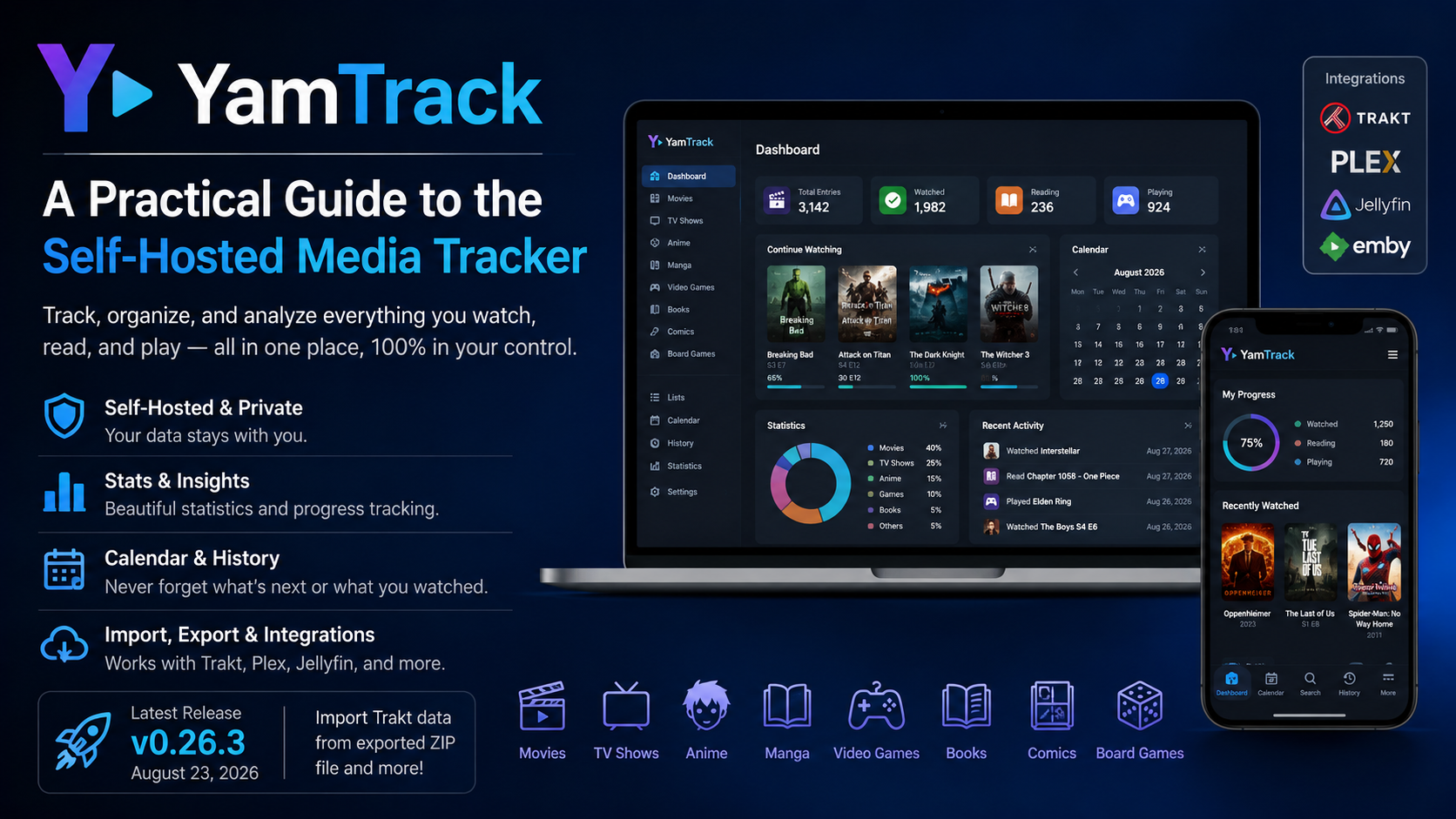
As of August 28, 2026, the upstream FuzzyGrim project lists Yamtrack v0.26.3 as its latest release. Version 0.26.3 was released on August 23, 2026 and added the ability to import Trakt data from an exported ZIP file. Releases 0.26.1 and 0.26.2 followed quickly after v0.26.0 with fixes for date handling, migrations, PostgreSQL startup, and other issues.
What Is Yamtrack?
At its core, Yamtrack is a self-hosted media tracker. “Self-hosted” means the software runs on infrastructure you control, such as a home server, NAS, virtual machine, or Docker host, instead of requiring you to store your tracking database on the developer’s hosted platform.
That distinction matters because Yamtrack is not designed to provide the media itself. It does not replace Netflix, Plex Media Server, Steam, Kindle, or other content-delivery systems. Instead, it creates a personal layer on top of those ecosystems where you can maintain a unified record of your media activity.
For example, you might use Yamtrack to record a movie as completed, keep a rating and note, follow a TV season episode by episode, track a game’s progress, or maintain a reading list. It can also automatically receive viewing information from Jellyfin, Plex, and Emby, which can reduce the amount of manual tracking required.
The project is distributed under the AGPL-3.0 license, making it open-source software that can be used, modified, and redistributed under the terms of that license.
What Can Yamtrack Track?
One of Yamtrack’s biggest strengths is that it brings several types of media into the same interface.
| Media type | What Yamtrack can track |
|---|---|
| Movies | Status, rating, progress-related information, dates, notes, repeat activity |
| TV shows | Shows, individual seasons, and watched episodes |
| Anime | Anime titles and viewing activity |
| Manga | Manga reading activity |
| Video games | Game status and progress, with game-specific information |
| Books | Reading activity and related metadata |
| Comics | Comic tracking and metadata |
| Board games | Board-game tracking through BoardGameGeek integration |
The project also supports custom media entries, which is useful when an obscure title cannot be found in the connected metadata sources.
That broad coverage is important because many tracking services specialize in one area. A dedicated anime tracker may be excellent for anime but not useful for books or games. Yamtrack instead tries to make the personal tracking database itself the common layer.
How Yamtrack Works
A simple way to understand Yamtrack is to think of it as three connected pieces:
metadata, your personal tracking data, and automation.
1. Metadata comes from external services
When you search for a title, Yamtrack does not have to maintain every movie, game, book, or manga record entirely by itself. It can use external APIs to retrieve metadata.
The current documentation identifies several media sources, including The Movie Database (TMDB) for movies and TV, MyAnimeList for anime and manga, MangaUpdates for manga-related data, IGDB for games, Hardcover for books, and ComicVine for comics. The configuration can use API credentials for these providers, and some providers have default credentials while the project recommends personal keys where rate limits make that useful.
This model explains why Yamtrack can offer information such as posters, titles, release information, and other metadata without requiring its own enormous catalog database.
2. Your tracking information is stored locally
The metadata tells Yamtrack what a piece of media is. Your local Yamtrack database records what you did with it.
That can include a status, score, progress, start and end dates, repeat activity, notes, and a history of tracking actions. For TV, the system can treat seasons separately and can track individual watched episodes.
The distinction is useful. If the provider’s metadata changes, that does not fundamentally change the fact that you watched a particular movie on a certain date or rated it five stars. The external services supply reference information; Yamtrack is where your personal tracking record lives.
3. Background work handles automation
Yamtrack uses Redis and Celery for background processing. In practical terms, background workers allow operations such as scheduled imports and other asynchronous jobs to run without forcing every action to happen during a normal web request. The development documentation explicitly shows a Celery worker running with its scheduler, while the configuration documentation identifies Redis as the backing service used for these tasks.
For a user, the important takeaway is simple: Yamtrack is more than a static database with a web page on top. It has an application layer, a database, a cache/background-task layer, and external integrations.
Why the Self-Hosted Model Matters
Self-hosting gives Yamtrack a different value proposition from a typical SaaS media tracker.
With a hosted service, the company operates the servers and database. With Yamtrack, you operate the software and retain control over where its database lives. That can be attractive for users who already operate a NAS or homelab and want their media history to remain part of that environment.
There is also a practical resilience benefit. Your tracking data is not inherently tied to a single website account. Yamtrack provides CSV export and import, giving users a way to move tracked media data in and out of the application.
Self-hosting does come with a trade-off: you become responsible for administration. Updates, backups, authentication, reverse proxies, TLS, storage, database health, and service monitoring are your responsibility. That is the price of control.
Yamtrack’s Most Useful Features
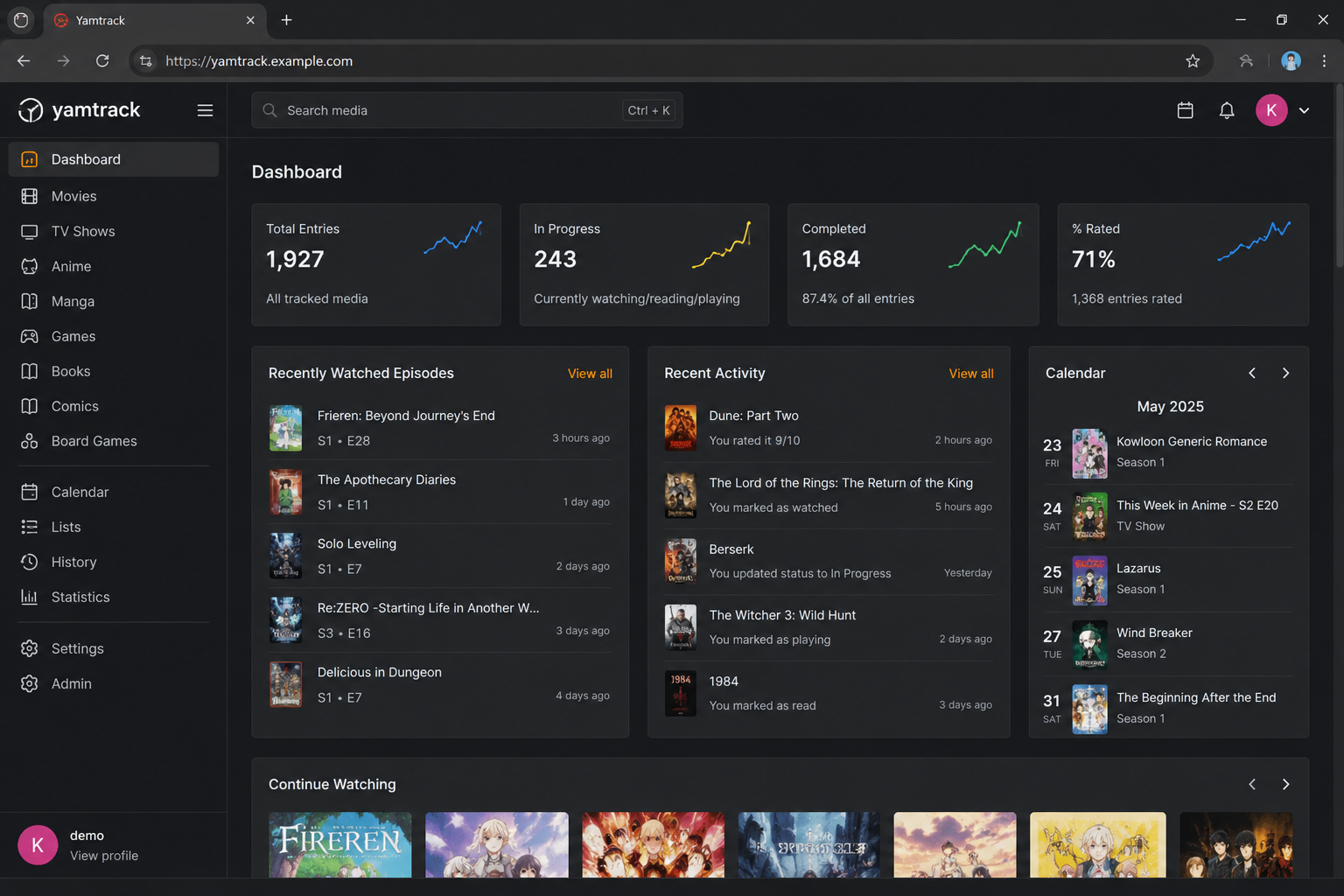
Episode and Season Tracking
TV tracking is more granular than simply marking a show “watched.” Yamtrack can track seasons separately and record watched episodes. That makes it better suited to long-running shows where overall completion is not enough to describe your actual progress.
A 2026 release also improved episode-tracking usability and corrected timezone-related behavior around episode-watch dates.
Lists and Collaboration
Yamtrack supports personal lists for organizing media. Lists can also involve other members, and the project added public read-only media lists in v0.25.3. This makes the feature useful not only as a private watchlist but also as a way to present curated collections to other people.
Calendar and Upcoming Releases
The application includes a calendar for upcoming media and can expose that calendar through an iCalendar (.ics) URL, allowing it to be consumed by external calendar applications. This is especially useful for users who want release reminders alongside their normal calendar workflow.
Notifications
Yamtrack uses Apprise for notifications and supports services such as Discord, Telegram, ntfy, Slack, and email among the available notification targets. This can turn the tracker from a passive database into a release-alert system.
History and Statistics
The project records tracking activity rather than only the final status. That means users can inspect historical actions and, in newer releases, use a dedicated journal page that groups watch, read, and play history by day. The statistics page also gained indicators such as “In Progress,” “% Rated,” and consumption breakdown information in v0.26.0.
Search and Manual Entries
Yamtrack can search external metadata providers, while also allowing users to create manual media entries for material that is missing from those catalogs. Version 0.26.0 also expanded search so that a media search can match against the user’s notes, not only the title.
Integrations: Where Yamtrack Becomes More Powerful
One of the clearest reasons to run Yamtrack is integration with services that already know what you watched.
The official feature list identifies integrations with Jellyfin, Plex, and Emby, allowing watched media to be tracked automatically from those systems. For someone with a home media server, this removes one of the biggest weaknesses of manual trackers: forgetting to update them after watching something.
Yamtrack also supports data import from services including Trakt, Simkl, MyAnimeList, AniList, and Kitsu, with periodic automatic imports available for supported sources.
The latest upstream release, v0.26.3, specifically added importing Trakt data from an exported ZIP archive. This is a meaningful improvement for people migrating from Trakt because it provides another path for bringing an existing history into a self-hosted installation.
An important caveat is that integrations depend on third-party services and APIs. Problems on the provider side, API changes, rate limits, incomplete metadata, or credential configuration can affect the result. Yamtrack’s issue tracker continues to show real-world integration problems; for example, an open July 2026 issue reported a Steam sync configuration problem on v0.25.3.
How to Install Yamtrack
For most users, Docker and Docker Compose are the recommended deployment route.
The official setup documentation says that a Docker installation can use a published Yamtrack image, so cloning the source repository is not necessary for a normal deployment. The default Compose configuration uses SQLite, and the project considers that sufficient for most personal installations. PostgreSQL is also supported for users who prefer a separate database server.
A simplified installation flow looks like this:
- Download the official Compose file.
- Set a strong
SECRETvalue. - Start the stack with Docker Compose.
- Open Yamtrack on its configured web port.
- Configure external providers and integrations as needed.
The project documentation currently uses docker compose up -d for the SQLite setup and provides a separate PostgreSQL Compose configuration.
For a local or private homelab deployment, SQLite is the easiest starting point. For a larger or more infrastructure-oriented environment, PostgreSQL provides a more conventional dedicated database architecture. Yamtrack’s configuration documentation states that PostgreSQL is selected when DB_HOST is configured; otherwise SQLite is used.
Reverse Proxy and HTTPS Considerations
Running Yamtrack behind a reverse proxy requires more than simply forwarding port 8000.
The current documentation provides the URLS setting as a shortcut for configuring both trusted CSRF origins and allowed hosts. It should match the public origin of the site, including the protocol, and the documentation notes that this configuration is important for reverse-proxy deployments, OAuth redirects, and webhook integrations.
For example, a deployment using https://yamtrack.example.com needs Yamtrack to know that this is its public origin. When misconfigured, the application can respond with 403 Forbidden errors even though the containers themselves are running correctly.
This is a good example of an important self-hosting lesson: an application can be healthy internally while still being incorrectly exposed through the proxy layer.
Authentication and Multiple Users
Yamtrack is not limited to one-person installations. It supports multiple user accounts, with personal tracking data associated with individual users. The project also supports OpenID Connect (OIDC) and a broad range of social authentication providers through Django Allauth.
That makes Yamtrack suitable for a household server or small private group, although a multi-user deployment increases the importance of proper access control, secure authentication, backups, and HTTPS.
The configuration also includes options to disable public registration, restrict authentication to social providers, and configure single sign-on behavior.
How the Architecture Fits Together
At a high level, a typical Yamtrack deployment can be thought of like this:
Your browser → Yamtrack web application → database
Around that core are several supporting services:
Redis → caching and task infrastructure
Celery → background and scheduled jobs
External APIs → media metadata
Jellyfin/Plex/Emby → watch-event integrations
Import services → migration and synchronization
The development documentation shows Yamtrack running on Django, with Celery workers and Tailwind CSS as part of the development stack. The repository is also explicitly categorized with Docker, Docker Compose, SQLite, PostgreSQL, Django, and Tailwind CSS.
Understanding this architecture explains why Yamtrack feels more like a complete self-hosted application than a simple hobby database. Its web layer handles the user interface and authentication, the database stores application data, external APIs supply media information, and background workers handle jobs that do not need to block the main web process.
Advantages of Yamtrack
The strongest advantage is consolidation. Instead of maintaining separate histories for movies, anime, books, games, and other forms of media, one application can cover them all.
The second advantage is control. Because it is self-hosted and open source, users can choose where the service runs and how the database is managed. CSV import/export also gives the data a degree of portability.
Another major strength is automation. Plex, Jellyfin, and Emby integrations can reduce manual updates, while scheduled imports, notifications, and calendar feeds extend Yamtrack beyond a simple checklist.
Finally, Yamtrack is actively evolving. The upstream repository shows continued releases in August 2026, including v0.26.0, v0.26.1, v0.26.2, and v0.26.3.
Limitations and Things to Watch
The biggest limitation is that self-hosting is still self-hosting. A managed service may be easier for someone who does not want to maintain containers, databases, authentication, DNS, backups, and reverse proxies.
The second limitation is dependence on external metadata and integration providers. Yamtrack can unify many sources, but that does not eliminate the technical differences between those sources. Search coverage, identifiers, release data, API quotas, and synchronization behavior can vary from provider to provider. The documentation itself exposes multiple provider-specific API credentials and settings, while recent GitHub issues demonstrate that integration edge cases continue to occur.
There are also signs that the project is mature enough to have a substantial issue tracker rather than being a completely trouble-free utility. Open issues in 2026 include reported problems with Trakt imports and metadata-source behavior, illustrating why users should treat synchronization as a feature that deserves occasional checking rather than assuming every provider will always behave perfectly.
Is Yamtrack Better Than Trakt or Simkl?
That depends on what “better” means.
Trakt and Simkl are hosted services, which makes them attractive for users who want minimal infrastructure work. Yamtrack is attractive when the priority is self-hosting, centralized personal data, broad media coverage, and integration with an existing homelab.
There is also a practical migration angle: Yamtrack supports imports from Trakt and Simkl, and its current releases continue to improve migration support. That means users do not necessarily have to choose between an existing hosted tracker and a new self-hosted database forever; migration can be part of the transition.
The better choice therefore depends on whether you value convenience or control more highly.
Who Should Use Yamtrack?
Yamtrack makes the most sense for someone who says:
“I already run Docker, I want my media history in one place, and I would rather operate the service myself than depend on another hosted tracker.”
It is especially well suited to homelab enthusiasts, self-hosting users, Plex/Jellyfin/Emby households, collectors with large mixed-media libraries, and users migrating from other tracking platforms. Its wide media coverage also makes it valuable for people whose interests extend beyond movies and TV.
Someone who simply wants a zero-maintenance tracker may prefer a hosted service. Yamtrack’s appeal is strongest when ownership, flexibility, integrations, and control of the underlying data matter more than eliminating server administration.
Yamtrack FAQ
What is Yamtrack used for?
Yamtrack is used to track movies, TV shows, anime, manga, games, books, comics, and board games. Users can record statuses, ratings, progress, notes, dates, repeats, and history, while also using lists, calendars, notifications, imports, and statistics.
Is Yamtrack free and open source?
Yes. The upstream project is publicly available on GitHub and is licensed under AGPL-3.0.
Does Yamtrack have a Docker installation?
Yes. Docker Compose is the documented deployment method, with SQLite available for straightforward personal installations and PostgreSQL available as an alternative.
What is the latest Yamtrack version?
As of August 28, 2026, the latest upstream release is Yamtrack v0.26.3, released on August 23, 2026. Its headline feature is support for importing Trakt data from an exported ZIP file.
Can Yamtrack automatically track Plex or Jellyfin viewing?
Yes. Yamtrack lists Jellyfin, Plex, and Emby integrations that can automatically track newly watched media.
Does Yamtrack support PostgreSQL?
Yes. PostgreSQL is supported alongside SQLite. The current documentation says SQLite is used by default unless DB_HOST is configured for a PostgreSQL database.
Does Yamtrack replace Plex or Jellyfin?
No. Yamtrack is a tracking and cataloging application, not a media server. Plex, Jellyfin, and Emby can feed watch activity into Yamtrack, but they perform the separate job of managing and delivering media.
Bottom Line
Yamtrack is one of the more comprehensive options for users who want a self-hosted media-tracking database rather than another hosted account. Its appeal comes from the combination of broad media support, detailed history, lists and statistics, external metadata APIs, import/export tools, calendar and notification features, and integrations with home-media platforms.
The project is also actively maintained, with v0.26.3 released on August 23, 2026 and several improvements and fixes delivered in the preceding August releases.
For a casual user who wants everything handled automatically, a hosted tracker may still be simpler. For a user who already understands Docker and wants ownership of their media history, integrations with a homelab, and one database for movies, shows, anime, books, games, and more, Yamtrack is a compelling self-hosted option.
Also Read: GradeMelon | What It Is, How It Works, and Whether It’s Safe to Use

1 Comment
Pingback: WeChat MiniProgram Cloud Development Local Emulator Docker 2024