



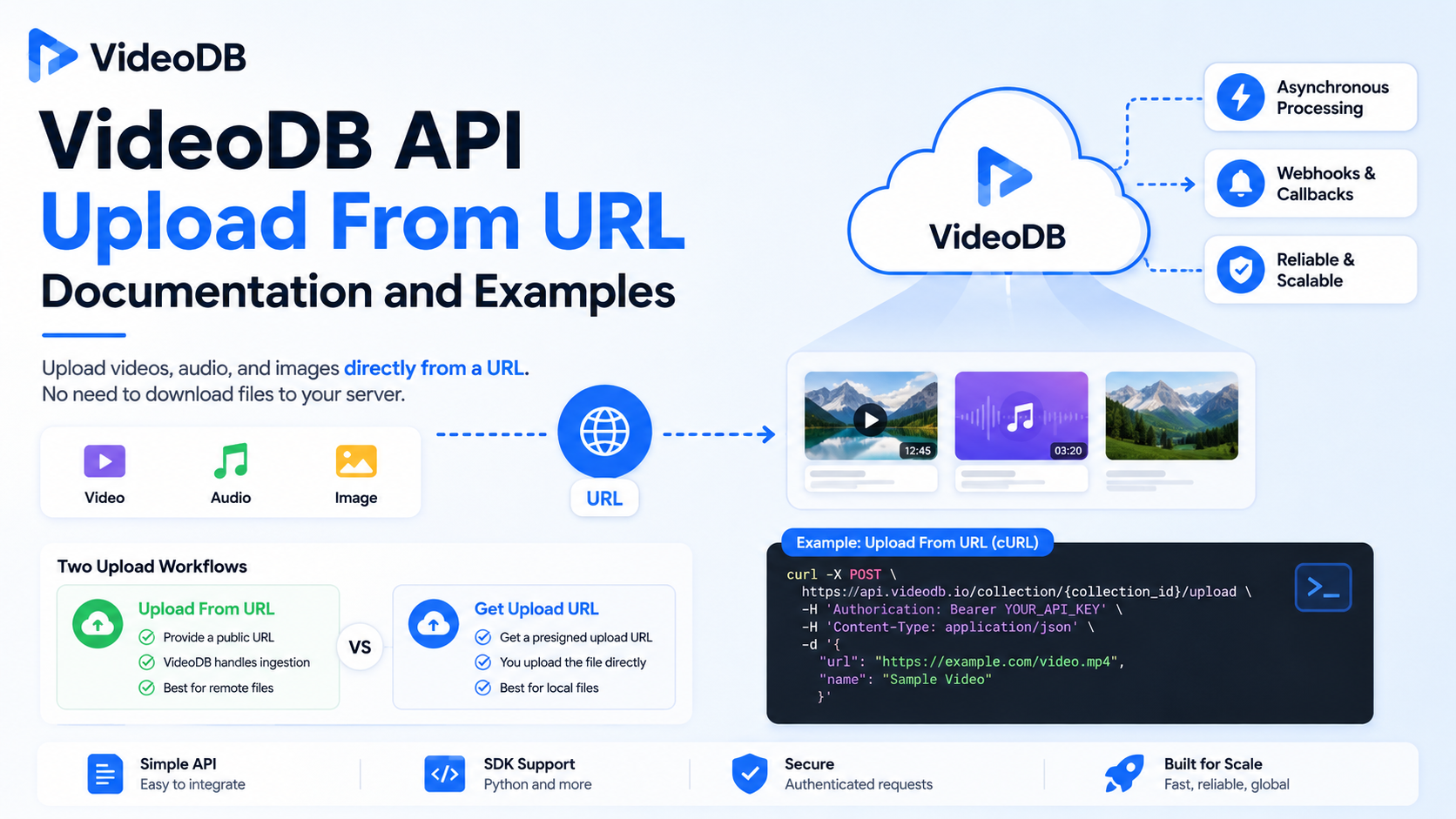
VideoDB supports uploading videos, audio files, and images directly from a URL, making it possible to ingest remote media without first downloading the file to your own application server. The current REST API exposes this through the POST /collection/{collection_id}/upload endpoint, while the Python SDK provides the simpler coll.upload(url="...") interface.
For developers building media-processing or AI applications, the important distinction is that “upload from URL” and “get an upload URL” are two different workflows. With upload-from-URL, you give VideoDB a publicly reachable source URL and VideoDB handles the ingestion. With a presigned upload URL, your application sends the actual file bytes directly to storage. Understanding that difference prevents a common implementation mistake.
This guide explains the current VideoDB API approach, the exact request structure, Python and cURL examples, asynchronous processing, callbacks, common errors, and when to use each upload method.
What does VideoDB upload from URL mean?
A URL upload means that your application tells VideoDB where a media file is located rather than sending the media bytes in the API request.
For example, suppose your application has a video at:
https://example.com/videos/meeting.mp4
Instead of downloading that video to your server and then uploading it again, you can send the URL to VideoDB:
video = coll.upload(
    url="https://example.com/videos/meeting.mp4"
)
VideoDB’s Python SDK documents URL-based ingestion alongside local-file uploads, and the SDK returns a media object representing the uploaded asset.
The same operation is available through the REST API:
POST https://api.videodb.io/collection/{collection_id}/upload
The request body contains the source url and can also specify a name, media type, and callback URL.
The practical benefit is simple: your application does not need to become the middleman for the entire media file.
How the VideoDB URL-upload flow works
The process can be understood as four basic steps.
First, your application authenticates with VideoDB. The API uses an API key supplied in the x-access-token HTTP header. VideoDB’s REST API documentation specifies this header as the required authentication mechanism.
Second, your application sends the media URL to the collection upload endpoint. The request identifies the target collection and supplies the remote URL. The API also accepts optional metadata such as the media name and media type.
Third, VideoDB processes the upload. The REST response can indicate that the operation is still processing, rather than meaning that the media is already completely ready for every downstream operation. The documented response includes an asynchronous operation identifier and an output_url pointing to VideoDB’s async-response endpoint.
Fourth, your application waits for completion or receives a callback. For production systems, VideoDB documents callback-based workflows so that your backend can react when the media becomes available instead of repeatedly checking its status.
That distinction matters because starting an upload is not necessarily the same thing as finishing an upload.
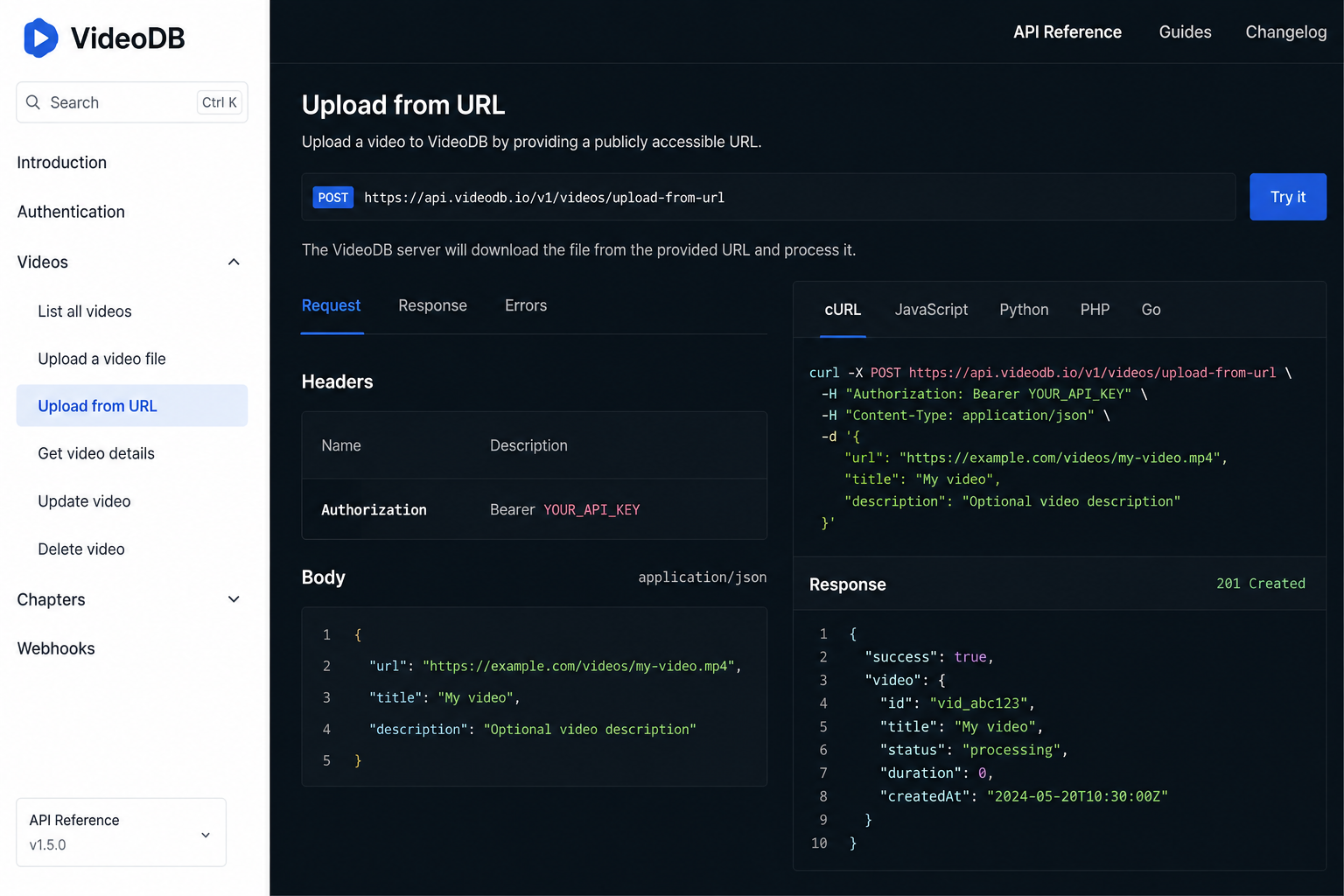
VideoDB REST API: upload a video from a URL
The core REST endpoint is:
POST /collection/{collection_id}/upload
The full API URL documented by VideoDB is:
https://api.videodb.io/collection/{collection_id}/upload
Authentication is sent with the x-access-token header. The request body is JSON.
A basic cURL request looks like this:
curl --request POST \
  --url https://api.videodb.io/collection/default/upload \
  --header 'Content-Type: application/json' \
  --header 'x-access-token: YOUR_API_KEY' \
  --data '{
    "url": "https://example.com/video.mp4",
    "name": "My Video",
    "media_type": "video"
  }'
The documented request fields include:
| Field | Required | Purpose |
|---|---|---|
url | Yes | Source URL of the media |
name | No | Name assigned to the uploaded asset |
media_type | No | video, audio, or image |
callback_url | No | Webhook URL for asynchronous completion |
The API reference currently describes url as required and lists video, audio, and image as the supported values for media_type.
For a normal video file, a minimal request can therefore be as small as:
{
  "url": "https://example.com/video.mp4"
}
Adding name and media_type can make the request clearer and easier to manage in larger applications.
What response does the API return?
VideoDB documents an upload response in which the operation can begin in a processing state:
{
  "success": true,
  "status": "processing",
  "data": {
    "id": "job-123",
    "output_url": "https://api.videodb.io/async-response/job-123"
  }
}
This response is important because it tells you that the request was accepted, but processing may still be underway. The returned asynchronous operation can then be checked through VideoDB’s async-response endpoint.
The async endpoint is:
GET https://api.videodb.io/async-response/{response_id}
It uses the same x-access-token authentication scheme. VideoDB documents statuses including processing, done, and failed for these operations.
A polling request looks like:
curl --request GET \
  --url https://api.videodb.io/async-response/job-123 \
  --header 'x-access-token: YOUR_API_KEY'
A completed operation can return the resulting media information in its data object. The exact contents depend on the operation being tracked.
Python SDK: the simplest way to upload from a URL
Developers using Python generally do not need to construct the REST request manually.
The VideoDB Python SDK documents the following pattern:
import videodb

conn = videodb.connect(api_key="YOUR_API_KEY")
coll = conn.get_collection()

video = coll.upload(
    url="https://example.com/video.mp4"
)

print(video.id)
print(video.stream_url)
The current SDK README documents URL uploads, local-file uploads, and uploads to a collection. It also states that the returned object is represented as a Video, Audio, or Image object according to the media type.
You can also provide metadata:
video = coll.upload(
    url="https://example.com/video.mp4",
    name="Quarterly Meeting",
    description="Recorded quarterly meeting"
)
The SDK documentation shows metadata such as name and description as supported upload arguments in its examples.
For applications that simply need to take a remote video and put it into VideoDB, the SDK is usually easier to read and maintain than hand-written HTTP requests.
Uploading from a YouTube URL
VideoDB’s Python SDK also documents URL-based ingestion from YouTube:
video = conn.upload(
    url="https://www.youtube.com/watch?v=VIDEO_ID"
)
The SDK README explicitly gives a YouTube URL as an upload example, while also showing arbitrary public media URLs such as https://example.com/video.mp4.
This is useful because a URL does not necessarily have to point to a file with a simple .mp4 filename. However, developers should still treat source accessibility as a requirement. If VideoDB cannot retrieve the URL, the ingestion will fail.
For that reason, do not assume that every webpage URL is automatically a valid media source. A page containing a video is not necessarily equivalent to a directly retrievable media URL.
What makes a URL suitable for VideoDB ingestion?
The key requirement is practical rather than cosmetic: VideoDB needs to be able to retrieve the media from the supplied URL.
The VideoDB collection-pattern documentation specifically lists Download failed as a common upload failure and gives an inaccessible URL as the cause. Its recommended action is to verify the URL and its permissions.
That means these cases can cause problems:
- A URL that no longer exists
- A private object that VideoDB cannot access
- A link requiring browser-only authentication or a user session
- A source server that blocks the request
- A URL that points to an unexpected or invalid media resource
- A corrupted source file
The safest approach is to provide a stable, reachable media URL and verify that the remote source can actually be downloaded by an external service.
URL upload vs. presigned upload URL
One of the most important details in the current VideoDB documentation is that upload and upload_url describe different directions of data transfer.
Upload from URL
With:
POST /collection/{collection_id}/upload
you provide VideoDB with a media URL.
Conceptually:
Your application
       |
       |  "Here is the media URL"
       v
    VideoDB
       |
       |  Retrieves media
       v
Remote media source
This is convenient when the video already exists somewhere accessible over the network.
Get an upload URL
With:
GET /collection/{collection_id}/upload_url
VideoDB instead gives your application a presigned URL for direct file upload. The documented response includes an upload_url and a pre-assigned video_id. The documentation specifically describes this workflow as useful for client-side uploads where you do not want to route the file through your application server.
Conceptually:
Browser / client
       |
       |  File bytes
       v
Presigned storage URL
       |
       v
VideoDB storage
The presigned URL is temporary, and VideoDB documents that it should be used with a PUT request.
Which one should you use?
| Situation | Better fit |
|---|---|
| Media already exists at a public/reachable URL | Upload from URL |
| Browser user selects a local file | Presigned upload URL |
| You want to avoid sending large files through your backend | Presigned upload URL |
| A third-party system already exposes the media URL | Upload from URL |
| Server already has the local file | SDK/local-file upload |
The important idea is that upload-from-URL saves you from moving the same file through your own infrastructure twice, while a presigned upload is designed for direct client-to-storage transfer.
Adding a callback for production workflows
For a small script, polling may be sufficient. For a production application processing many files, callbacks are usually the more natural design.
VideoDB documents callback_url as an optional field for uploads:
video = coll.upload(
    url="https://example.com/large-video.mp4",
    callback_url="https://your-backend.com/webhooks/upload"
)
The upload guide shows a webhook payload containing the completed media’s ID, collection ID, name, stream URL, and player URL.
A simplified backend flow could look like:
from fastapi import FastAPI, Request

app = FastAPI()

@app.post("/webhooks/upload")
async def handle_upload(request: Request):
    event = await request.json()

    if event["success"]:
        video_id = event["data"]["id"]
        print(f"Video ready: {video_id}")
        # Start your next processing step here.
    else:
        print("Video upload failed")

    return {"status": "ok"}
VideoDB’s documented collection-pattern example uses this same general architecture: receive the callback, check whether the operation succeeded, then trigger the next stage such as indexing.
This matters for large media pipelines because the application can move from:
Upload → Poll → Poll → Poll → Poll
to:
Upload → Wait for callback → Process
That reduces unnecessary status requests and fits naturally into event-driven systems.
Uploading multiple URLs
VideoDB’s documentation also demonstrates a fire-and-forget approach for batches:
for url in video_urls:
    coll.upload(
        url=url,
        callback_url="https://your-backend.com/webhooks/upload"
    )
The collection-pattern guide presents callbacks as the mechanism for responding to each completed upload and continuing the workflow.
This is particularly useful for applications such as:
media archives, where many videos must be ingested;
AI video search, where content must be uploaded before indexing;
meeting pipelines, where recordings move automatically into transcription;
and content-processing workflows, where upload completion triggers subsequent analysis.
VideoDB’s current platform is designed around ingesting media and then applying operations such as understanding, indexing, search, and playback.
What happens after the upload?
Uploading a video to VideoDB is generally the ingestion step, not the end of the AI workflow.
The current Python SDK describes a pipeline in which uploaded media can subsequently be understood and indexed. VideoDB’s newer architecture separates Understand → Index → Retrieve, where understanding generates reusable, timestamped artifacts and indexing prepares those artifacts for retrieval.
For example, after uploading a video, an application can create spoken-word or visual analysis:
understanding = video.understand(
    analyzers=[
        {"type": "spoken_words", "name": "transcript"},
        {"type": "vlm", "name": "scene"},
    ]
)

understanding.wait_until_complete()
The SDK documentation lists analyzer types including spoken words, VLM, object detection, OCR, brand detection, activity recognition, and location detection.
For simpler or legacy workflows, VideoDB also documents methods such as index_spoken_words() and index_scenes().
In other words, the URL upload gets the media into the database; indexing and understanding make the content useful for AI applications.
Common VideoDB URL upload errors
“Download failed”
This generally means VideoDB could not retrieve the source URL. The official collection-pattern documentation specifically identifies an inaccessible URL as a cause.
Check that the URL:
- Still exists
- Is reachable from outside your network
- Does not require an unavailable login or session
- Points to the intended media
- Is not blocked by the source server
“Invalid media type”
VideoDB documents Invalid media type as another common error and recommends matching the MediaType to the actual file.
For REST requests, the supported media_type values documented for collection uploads are:
video
audio
image
Corrupted source media
The collection-pattern guide lists a corrupted file as a cause of a generic processing failure and recommends re-encoding the source media when appropriate.
The important lesson is that an HTTP-accessible URL is not enough by itself. The underlying media must also be valid and usable.
Authentication failures
For the VideoDB API itself, missing or invalid authentication produces an HTTP 401 according to the REST API documentation. The documented authentication header is x-access-token.
A common implementation mistake is to confuse authentication to VideoDB with access to the remote media URL. They are separate problems. Your API key may be perfectly valid while the remote media URL is inaccessible.
Security considerations
An important security principle is to treat remote URLs as untrusted input.
If your application allows end users to submit arbitrary URLs, validate and restrict them according to your application’s threat model. A URL ingestion feature can become a security boundary because the backend is being asked to retrieve externally supplied resources.
At the VideoDB API level, API keys should likewise be treated as secrets and sent in the authentication header rather than exposed unnecessarily in client-side code. VideoDB’s REST documentation explicitly requires the x-access-token API key header.
For browser-based applications, the documented presigned-upload workflow can be a better fit when users are uploading their own files, because the file can be sent directly to the upload destination rather than passing through your application server.
Best practices for VideoDB URL uploads
For reliable production ingestion, a few practices are especially useful.
Use stable source URLs. Do not rely on temporary links unless you know they will remain valid long enough for VideoDB to retrieve the media.
Use callbacks for long-running workflows. VideoDB explicitly documents callback-based upload processing for production patterns.
Record the VideoDB media ID. Once a media object is available, its ID becomes the identifier your application can use for later operations. The upload guide documents media IDs such as m-xxx for videos.
Separate ingestion from analysis. Uploading and AI indexing are different stages. Designing them as separate jobs makes retries and monitoring easier. VideoDB’s current SDK architecture explicitly separates understanding and indexing.
Do not assume 200 OK means every processing step is finished. The upload API can return a successful response while the operation remains in processing, so your application should use the documented async response or callback mechanism when completion matters.
A complete Python example
For a straightforward server-side application, the workflow can be kept simple:
import os
import videodb

API_KEY = os.environ["VIDEO_DB_API_KEY"]

conn = videodb.connect(api_key=API_KEY)
coll = conn.get_collection()

video = coll.upload(
    url="https://example.com/video.mp4",
    name="Customer Demo"
)

print("Video ID:", video.id)
print("Stream URL:", video.stream_url)
For an application that needs completion callbacks:
video = coll.upload(
    url="https://example.com/video.mp4",
    name="Customer Demo",
    callback_url="https://your-domain.com/webhooks/videodb"
)
The exact downstream processing depends on what the application needs. A transcript workflow might create a spoken-word index, while a visual search application might build a scene index or use the newer understanding/index architecture documented in the current SDK.
VideoDB URL upload vs. local file upload
VideoDB’s Python SDK supports both approaches:
# Remote media
video = coll.upload(
    url="https://example.com/video.mp4"
)

# Local media
video = coll.upload(
    file_path="./video.mp4"
)
The choice depends on where the media already lives.
If a customer, storage service, or media system already gives you a reachable URL, URL ingestion is usually the cleaner path.
If your application has already produced a file locally, a local-file upload may be more appropriate.
And if the file originates in a browser, the presigned upload URL workflow can prevent the file from unnecessarily traveling through your own backend.
FAQ
Does VideoDB support uploading a video directly from a URL?
Yes. The current VideoDB REST API provides POST /collection/{collection_id}/upload with a required url field, and the Python SDK exposes the same workflow through coll.upload(url="...").
Can I upload audio and images from URLs too?
Yes. The collection upload API documents video, audio, and image as supported media_type values.
Does VideoDB download the URL itself?
The URL-upload workflow is designed around providing VideoDB with the source URL for ingestion. The documented error handling specifically refers to failures when the service cannot download or access the supplied URL.
Is URL upload synchronous?
Not necessarily. The API can return a processing status and an asynchronous response identifier. For production workflows, VideoDB also documents callback URLs for receiving completion notifications.
What is the difference between upload(url=...) and upload_url?
upload(url=...) tells VideoDB where the source media is located. upload_url is a separate API operation that gives your application a temporary presigned URL so the application can upload the actual file directly.
Can I use a YouTube URL?
VideoDB’s current Python SDK explicitly documents uploading from a YouTube URL as an example.
What should I do if VideoDB reports “Download failed”?
First verify that the supplied URL is externally reachable and that VideoDB can access the media without unavailable authentication or permissions. VideoDB’s production-pattern documentation identifies URL inaccessibility as the primary cause of this error.
Bottom line
For the current VideoDB API, uploading media from a URL is straightforward: authenticate with your API key, call POST /collection/{collection_id}/upload, and provide the source URL. The Python SDK reduces the same workflow to coll.upload(url="...").
The most important implementation detail is understanding the asynchronous nature of media ingestion. A successful request can still be processing, so applications that depend on upload completion should use the documented async-response mechanism or a callback.
Finally, do not confuse URL ingestion with VideoDB’s presigned upload URL API. The first lets VideoDB retrieve an existing remote resource; the second lets your application upload file bytes directly to the designated upload destination. Choosing the correct flow can make a significant difference in architecture, bandwidth usage, and reliability.
Also Read: This Page Has Been Blocked by Strict Blocking Rules.

2 Comments
Pingback: Audiobookshelf Suddenly Failed Stream Errors and All Covers Are Gone
Pingback: Droven.io USA Tech Market Updates | What the Platform Covers in 2026